
![How to Watch Local Channels on Firestick?[TOP 10]](https://techthanos.com/wp-content/uploads/2022/06/How-to-Watch-Local-Channels-on-Firestick.jpg)
FireStick is one of the best streaming devices you can get for your TV. There are many streaming service apps available on FireStick devices that can be used to watch Local Channels live. To know more about the apps with Local Channels on FireStick devices, you can read this article. Here are some of the best applications you can get on your FireStick and watch local channels live and on-demand content for free or with a subscription.
Table of Contents
How to Get Local Channels on FireStick?

Since FireStick devices cannot have access to cable or satellite service, you can only use streaming service apps to access Local Channels. You can get this app from your FireStick default app store. Some applications are free to use and some need subscription to access local channels on your FireStick devices. Local Channels are mostly used to watch the news and get updated on the weather in your area. To install applications on your FireStick you can refer to How to Install Apps on Firestick?
Apps with Local Channels on FireStick:
Here are some of the best apps to watch Local Channels on your FireStick device. With these apps, you can live stream the latest news and other local shows without any delay. For non-supported apps, you can just cast your device screen with the app to your Fire TV screen.
- Amazon News App
- AT&T TV
- News On
- fubo TV
- Hulu + Live TV
- Sling TV
- YouTube TV
- Pluto TV
- Xumo TV
- Locast
Amazon News App:
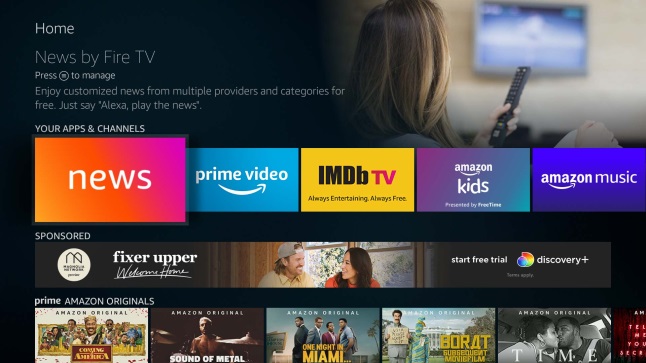
You can downlaod and use the Amazon News app on your FireStick device and have access to local channels in more than 80 cities in America; follow the instruction to download and access the app.
- When you switch on your TV and FireStick, you will land on FireStick Home Screen by selecting the HDMI port to which the FireStick device is connected.
- With your FireStick remote, navigate to Amazon News App present as a tile with the name “news” and press OK.
- Move to the Local News section under the More Channels tab and select Manage Local News.
- Choose any two preferred locations and press Continue
- On the “Selectyourfavouritelocal news channels”, select the network you like and tap on continue.
- Now select a national channel and add it as a favorite on the “Select your favorite national channels” section and press continue.
- Next, you will get asked to arrange the channels; if you want to arrange, then use your remote to arrange and press Done, and if you are not interested, press Done.
- You can find the channels you have selected under the Local News section.
With the following steps, you can now access your favorite local channel on your FireStick and watch its content for free.
NewsON:

With the NewsON application on FireStick, you can watch local news and weather from more than 200 US-based stations. You can easily find your hometown’s local stations and watch live TV under its Live Now section. There is no need to make an account or subscribe to access its content.
You can either directly get the app on your FireStick device or use the Silk browser to watch the local channels with news and weather on your FireTV.
Pluto TV on FireStick:

You can get the Pluto TV app from your FireStick default App Store easily. Local channels like CNN, NFL Channel, SKY News, CBSN, NBC News, and MTV are some of the popular channels you can watch with the Pluto TV app. These 250+ sports, comedy, lifestyle, kids, and local channels so your FireStick is free to watch. You may also like to learn about How to Install Pluto TV on Firestick?
Xumo TV:

Xumo is a free-to-download application with live and on-demand TV channels and programs for yoru FireStick device. All of its channels come under movies, news programs, sports, and more categories. Watch channels like FOX Sports, NBC News, Bloomberg, and more with Xumo on FireStick. You need to create an account to access its content on your device.
Locast:

This is one of the free live tv apps on FireStick that you can use to watch local channels in more than 35 cities; You can watch the channels like FOX, ABC, NBC, CBS, and CW. You need to create a locast account on the official website and install the app on your FireStick.
NOTE: The only drawback in using Locast is that for an interval of 15 minutes you get a prompt to donate $5. And to stop this annoyance you need to pay a donation.
You may also like to learn about How to Get Local Channels On Samsung Smart TV?
YouTube TV:

Using this Live TV app on your FireStick, you can watch most local channels with news, sports, and other varieties, along with ABC, FOX, CBS, and NBC channels. Along with local and national channels, you can also access Cinemax, STARZ, HBO, and ShowTime using YouTube TV on your FireStick.
fubo TV on FireStick:

You can find local channels like ABC, NBC, CBX, CW, and FOX. Other than its on-demand and live content. It also offers local and regional sports channels like FS1, FS2, MSG, NBCSN, NESN, and beIN Sports. The channels available in one region may not be present for other regions because the channels are distributed based on the location you are using them from.
Hulu + Live TV:

Depending on the location you live, you can watch channels like NBC, FOX, and ABC. This comes with the ESPN bundle when you subscribe to Hulu+Live TV; You can also watch live news, sports, and other entertainment channels. With the help of your area’s zip code, you can find the local channels available for your region.
You may also like to learn about How to Get Local Channels on Roku?
Sling TV:

By subscribing to Sling TV on your FireStick, you can watch local, national, and global channels.
Sling Orange:
- This subscription focuses on sports and entertainment channels like ESPN and Disney.
Sling Blue: The channels offered in this subscription are FOX News, Discovery, FOX, MSNBC, and NBC.
Sling Orange and blue: You can watch channels like CNN, Food Network, History Channel, and AMC.
NOTE: You can use the Sling TV app only in US and channels like CBS and ABC are not available in any of the Sling subscriptions.
You may also like to learn about How to Watch Local Channels on LG Smart TV?
THE END
You can now enjoy watching your favorite Local Channel shows, news, and more live on your FireStick devices with the help of this article. To live stream Local Channels on FrieStick, you need to have the best WiFi network to avoid errors while streaming.