
Are you interested in playing online games and freaking out to know how to play Jackbox games on Firestick? Then, follow this guide to see the answer. Playing game is the most extensive entertainment for everyone, and it changes our minds very enthusiastically and energetically. So read till the end to get all the info about this article.

Table of Contents
What is Jackbox Game?
Jackbox is a game that gathers around the TV and selects the device, like a smartphone or tablet, to pick the game. You can play with your devices by visiting the jackbox.tv website on your browser and then register your four-letter room code that views your screen.
The Jackbox party packs have been released with collections of digital platforms. When you register your display name, your device is connected to the game. Also, you can play on your Desktop, laptop, and gaming consoles like Nintendo Switch, PS4, and Xbox One. However, you can run it on your streaming devices, such as Amazon Firestick, Apple TV, and more.
Jackbox Party Pack on Firestick
Jackbox makes a few awesome multiplayer group games on your FireTV. They have now released a Party Pack 3, and we hope it will build a good reputation. This game box is available in five games, and it can be played by one to eight players. The Jackbox Party Pack 3 is supported on all Firestick devices and Fire TV remotes. Although you can watch TNT on Firestick as well. It is compatible with more streaming services and even gaming consoles. Firestick has many supported streaming services, such as TV land; you can get it directly from the Amazon app store.
In this game, it has the best feature, which is it offers to use your device mobile or tablet as a remote controller. If you plan to buy a new controller, there is no need for that. Finally, the Jackbox Party game is more compatible with all the Fire TV devices like Firestick devices, and even though your mobile phone or tablet can access it as a remote controller in this game.
How to Install The Jackbox Games on Firestick?
There are two more ways to download the Jackbox app on your Firestick device that are explained clearly in the following guide.
- Installing The Jackbox on Firestick directly.
- Using Sideload The Jackbox app on your Firestick.
Method1: Installing The Jackbox Games on Firestick Directly
Step 1
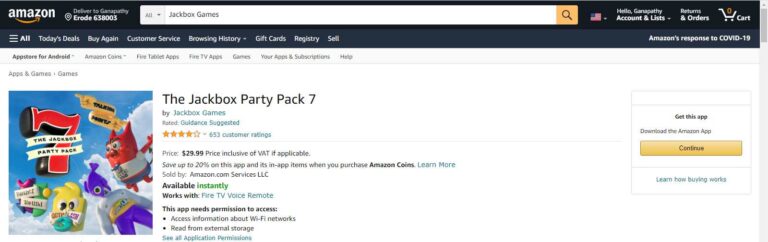
First, go to the Firestick apps store to find The Jackbox app on your Home screen menu.
Step 2
Navigate to the available apps and then search for The Jackbox app, and further choose the app to download.
Step 3
Now tap the Get option to install the Jackbox app.
Step 4
Then launch the app on your Firestick or Fire TV device when the app gets downloaded.
Method 2: Using Sideload The Jackbox app on your Firestick
Amazon Appstore has a large selection of apps and games to build in. You can get any android apps from it. Androids’ heavily modified versions are run into the Amazon Fire TV devices. Even though you can install the software not included via the official store using an APK file, follow the below steps to install the Jackbox app on your Firestick device by using the sideload method.
Step 1
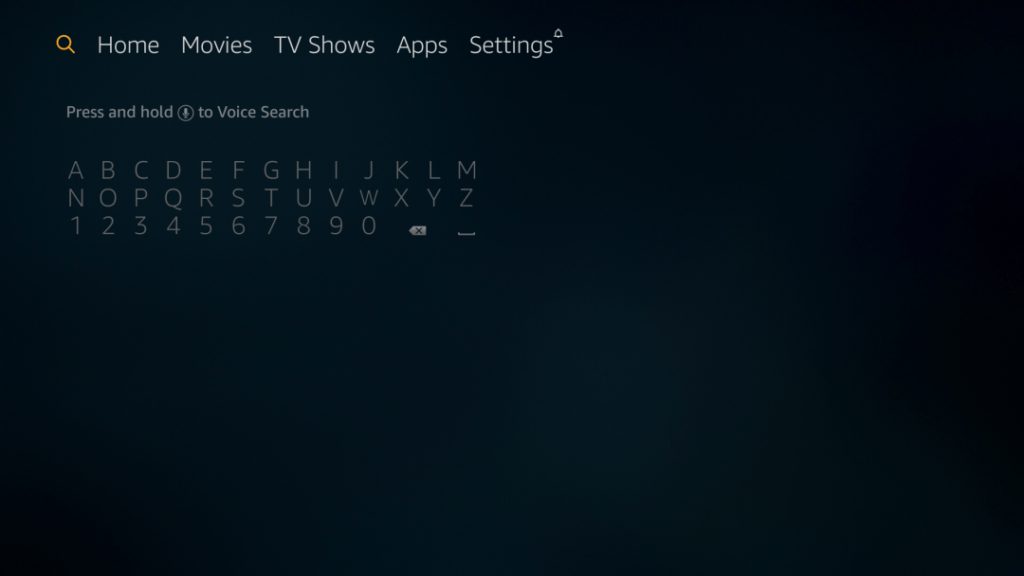
Navigate to the Find option from your smartphone’s home screen and then tap on the search icon.
Step 2
Find the Downloader app and choose it, then tap to download it.
Step 3
When the Downloader app has been installed that moves to your device’s Home screen further, go to the Settings option.
Step 4
Navigate to the My Fire TV and turn on the Install Unknown apps settings under the Developer option.
Step 5
Permit to access the Downloader app by clicking Allow key.
Step 6
Then, a pop-up appears as Quick Start Guide; tap the OK button.
Step 7
You will see a URL, tap on it, and press OK from your remote control.
Step 8
Furthermore, get the Downloader jackbox URL and then paste it on the respective field of the URL tab, then tap on the Go option.
Step 9
Finally, your Jackbox app will be downloaded and waiting until the download completes.
Step 10
Then install the app when the app gets downloaded.
Step 11
Tap on the Delete option to delete the file after the installation file is removed from your device.
Step 12
Your Jackbox app is situated on Apps and Channels under the See all option.
Method 3: Using Apps2Fire on Firestick
- Set up your Fire TV device and Android SmartPhone to high-speed internet.
- Get the Apps2Fire app and Jackbox app on your Android SmartPhone.
- Once it gets installed on your mobile from Google Play Store, you should launch it.
- Then open it and then click on the three-dotted menu from the upper left side of your screen.
- Again choose the Setup option and then paste the IP Address from the Fire TV device.
- Now enter into the Local Apps section and then choose your Jackbox games app to install on your device.
- It will start to download on your Fire TV device, and then install it.
- Once it gets installed successfully on your device.
- Now you can explore its content on your Fire TV-connected TV.
How to Play Jackbox Games on Firestick?
Step 1
Open the Jackbox app on your Firestick that you already installed.
Step 2
You will be promoted to a Room Code on your Firestick.
Step 3
Further, visit the jackbox—tv on your Android device browser.
Step 4
Then link your room code and your name in the display from your Android device.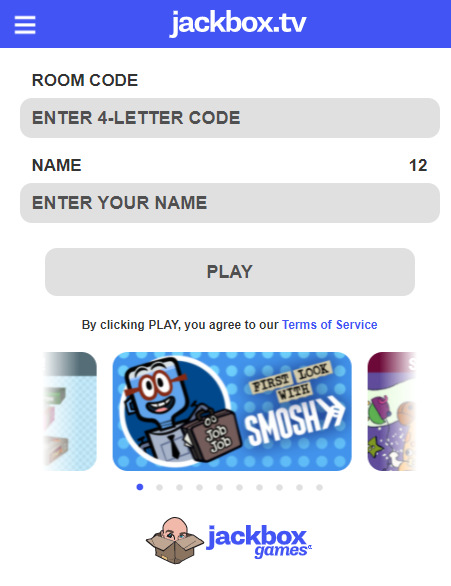
Step 5
After that, choose to play on your smartphone by clicking the play option.
Note: If you entered the room first, you would become the VIP, so the VIP only starts the game first. It is applicable only in your room that has enough players.
Now you will play your Jackbox game on your Firestick from your Smartphone device.
In addition, you can also able to screen mirror on your Fire TV using your Android or iOS Smartphones and desktop devices in order to play Jack boxes games.
Final Verdict:
Jackbox is a united states game-playing console, and you can play games online using Firestick and many other compatible devices. Firestick is more consistent on every device, and you can use your mobile phone as your controller for the gameplay. Above we briefly explained how to install and play the Jackbox on your Firestick using two types of methods.
FAQs:
1. Can you play the Jackbox game on Chromebook?
Yes, you can play the Jackbox game on Chromebook, Broforce, as well as Jackbox Party Pack 3.
2. Which devices can I play the Jackbox games on?
You can play on PC and Mac and neither steam nor Epic store. You can purchase the Jackbox game on Linux via Steam and buy steam codes in more places. Also, the official Jackbox games shop.
- How to Install AMC+ on Firestick?
- How to Update Peacock on Firestick?
- Top Dog IPTV: How to Install on Firestick?
- How to Install Sky Go on Firestick