
Sportsfire is a Sports platform and it has many kinds of different Sports events and tournaments are available in this service. Live and On-demand content are aired on this network. It will telecast the content from Sports such as NBA, NHL, NFL, UEFA Champions League, UFC, MMA, Tennis, Formula 1, and more sports events. All the channels are available in both HD and SD Quality. Never miss this amazing entertainment at your home. If you are looking for the article on How to Install Sportsfire on Firestick. Read this article, we will share all the steps and methods to download the App on your Firestick device.

Table of Contents
How to Install Sportsfire on Firestick?
The Sportsfire app is officially not available on your Firestick Amazon App Store. But you can download the app using the sideload method. here in this article, we will share the steps to get the Sportsfire app by using the downloader application. For this process, initially, you have to enable the App from an Unknown source. After that, it allows you to install the downloader app on your device.
Download the Sportsfire app and watch all kinds of sports Live and On-demand content. It is a totally Subscription free streaming service.
The Steps are:

- From the Firestick Home Page.

- Move to the Settings option.

- Press the MY Fire TV.

- After that, you have to click the developer option and following this Press the About Option.
- Next, you have to press the Fire TV Stick seven times.

- Further, click the Developer Option.

- Select the Apps from Unknown Sources.
- Press to Turn On.
- Return back to the Home page and choose the Find menu option.

- Tap the Search option.

- Now you have to Find the Downloader Apps from the List.
- Click the Get or Install option.
- Once your App is downloaded you have to click the OK button to prompt it.
- Text Box will be open from the Home Tab by default.
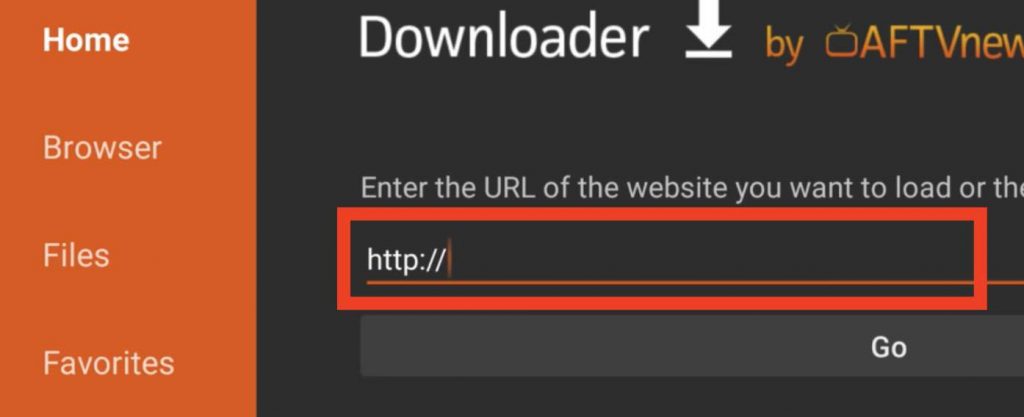
- Now you have to enter the URL and Press the GO button.
- Swipe Down and press the Download icon.
- You have to wait until the APK file is downloaded to your device.
- Once again click the Install button.
- If it is completed then you have to open and watch all your favorite Sports content.
Check the Post: How to Stream 2Watch on Firestick
How to Get SportsFire on Firestick using ES File Explorer?
Alternatively, you can use this ES File Explorer to download the Sportsfire apps on your Firestick. Here are the steps to install the app using this ES File Explorer.
- You have to download the ES File Explorer app on your devices.
- After that, Ensure that, turn on the install Unknown Sources.

- Now, Move to the Settings option–> My Fire TV Option–> Developer Options–> Install Unknown Apps—> ES File Explorer–> Turn On.
- Launch the ES file Explorer application and then choose the downloader icon in the Tools Section.

- After that, you have to choose the + New button available the the bottom of the screen.
- The Window will show you the Path and name Field.
- Now you have to enter the URL link to the respective field.
- Press the Download Now option and then you have to wait for the APK file to download on your device.
- If the APK file is downloaded on your device then you can press OK to continue the process.
Once the process is completed you have to choose your favorite shows, games, and from the Sportsfire Application.
Additional Info, How to Install Apps on Firestick
How to Use SportsFire on Firestick?
If you download the apps then you have to know the proper procedure to download the SportsFire app on your Firestick device. Suppose you want to access the content in any other restricted location then you can use the VPN service. It will Hide your IP address and personal activities.
The Steps are:
- Initially, you have to launch a VPN and connect the Server from the Specific Country.
- Relaunch the Installed App.
- Open the Sportsfire App.
- After that, you have to Press the OK button.
- Select the Channel to watch all your favorite content.
Live and On-demand content are available on this Streaming service.
Similar Post: How to Install Thoptv on Firestick
Highlights of the SportsFire App
- It is a Friendly user interface.
- You can get Ads-free Streaming content.
- Free to use on your devices.
- It doesn’t offer you any buffering or no-lagging content.
- Sportsfire App gives you the one Click Play option.
- It offers you many sports-related Live channels, nearly you can get 242 Channels.
- All the Videos are available in SD and HD Quality.
- Also, it provides a Sports schedule.
- It has an option to add your favorite to the Watchlist.
Closing Off
From this Guide, you can get the information on How to Install Sportsfire on Firestick. The Sports app is not available on the Amazon Firestick app store, So we have mentioned an alternative way to get the applications. There is only one way to download the apps using the sideload method. We have mentioned the methods of downloading apps from downloader and using ES file Explorer. Also, it has many special features. Never miss to utilize these features on your app and keep enjoying watching all your favorite sports with your family and friends. If you have any doubts related to this Guide, Let me know in this comment section. Thank You!