
![How to Change Language on Messenger? [iOS|Android]](https://techthanos.com/wp-content/uploads/2022/05/How-to-Change-Language-on-Messenger-iOSAndroid.jpg)
Messenger is the best messaging app that can help you chat with other users over your Facebook account. This app offers amazing features along with its chatting features, like transportation requests, secret conversations, AI chatbots, and more. You can use the messenger app on your smartphone and PC. Lately, many have been racking their brains on procedures to change the language on the Messenger application. To learn how to change the language on the Messenger app, follow this article.
Table of Contents
Messenger:

Messenger is an instant messaging platform developed by Meta. With the help of this app, you can chant with your Facebook friends and followers easily. On this application, you can send text messages, emojis, and photos, make calls, share locations, and make video calls. You can get this application on your Smartphones from their default app stores. To access the Messenger app, you need to sign in with your Facebook account credentials.
Why Change Language on Messenger?
The messenger app comes in the English language by default. Since Messenger is a globally used application, there are instances where the user may not be comfortable with English. To make chatting easier, the Messenger application has access to the language you know. But it does not have options to change language, but you can change the user’s device language.
You may also like to learn about How to Install Facebook on LG Smart TV?
How to Change the Language on Your Messenger app?
As discussed before, you cannot directly change the language of your Messenger application. But it does not mean it is impossible to change the language on this app. You can change the language of this app by changing your Smartphone language. The simple procedures you need to follow to change the language on this app are
How to Change Language on the Android Messenger app?
You can get the messenger app on your Andorid device from Google Play Store. After installation, you need to use your Facebook credentials to sign in to the messenger app. Since you need to change your android device language to get your desired language on the messenger app, follow the steps given here.
- Go to Settings on your Android phone.

- Select “Language & Region.”
- Tap on the “Language” option.
- From the list, select the preferred language.
- After selecting, tap on “Done.”
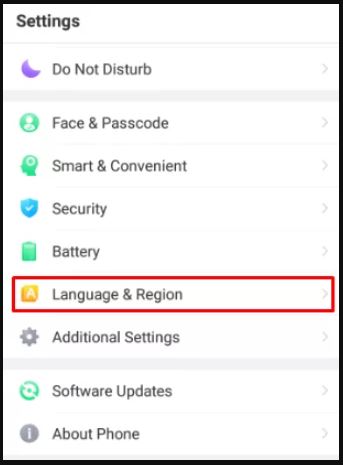
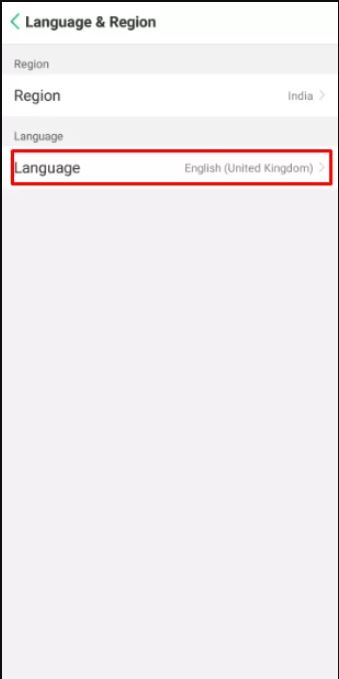
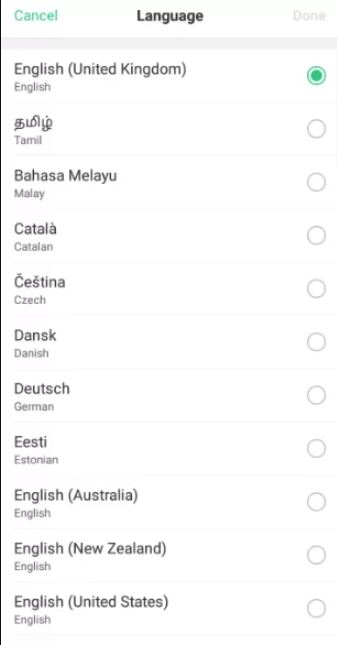
When you open your messenger app, you can see that its language has changed to the language you selected. If the language has not changed, try to restart your android smartphone. You may also like to learn about How to Get Facebook on Roku?
How to Change Language on the iPhone Messenger app?
For your iPhone, you can get the Messenger app Apple App Store. Get the app and sign in with your Facebook credentials. When you launch the app, it opens with English as its default language. If you want to change the language to your regional language, follow the steps given here.
- Tap on “Settings” from your Home screen.
- Select “General”
- On the option “Language & Region,” tap.
- “Device Language” is now selected.
- From the list, select the preferred language.
- Confirm your selection.

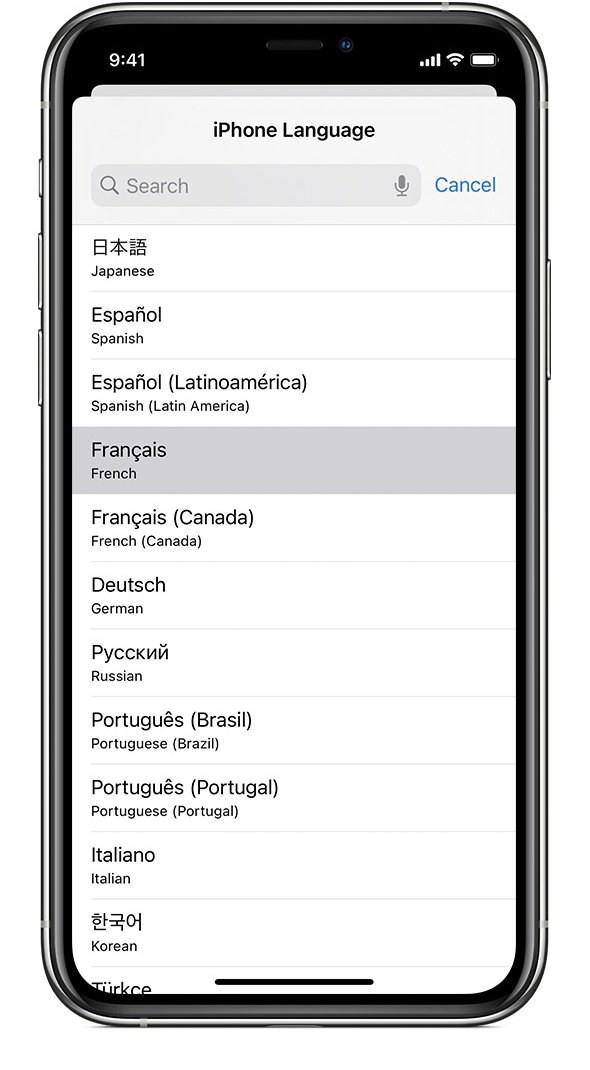
Now your iPhone language is charged, which changes the required app’s language. You may also like to learn about How to Download & Use Facebook on Firestick?
THE END
You can now use the Messenger app in the language you want with the help of this article. The Messenger application is ever-growing, and developers provide updates frequently. Ensure the Messenger application is always in its latest version to avoid errors. If the language on your Messenger app is not changing even after changing the language of your SmartPhone, try to restart your device.
Frequently Asked Questions:
Can I use Messenger to Chat with my Instagram Friends?
Yes, you can easily chat with your Instagram friends by simply typing their names in the search tab. Since your meta account has access to your Instagram and Facebook accounts, this is possible.
Can I make free video calls on Messenger?
You can access unlimited video calls using the messenger app. You can also host a video chat with 8 people with high-definition video and audio qualities. With interactive face filters, you can make the video call even more fun with your friends.