
![How to Get Crackle on Roku?[Install|Activate|Cast]](https://techthanos.com/wp-content/uploads/2023/03/How-to-Get-Crackle-on-RokuInstallActivateCast.jpg)
Crackle is one of the best video streaming platforms to watch full-length movies, TV Shows, and Crackle Originals for free. This application is available on a wide range of devices. But Can I Watch Crackle on Roku? If you are thinking of the same thing, then this article can help you. Here you can learn the installation, activation, and alternative methods you can use to get Crackle on Roku.
Table of Contents
Is Crackle on Roku?

Yes, You can get the Crackle App is compatible with Roku devices and can be installed directly from Channel Store. It is also possible to cast or mirror the Crackle app from other devices to your non-supported Roku TV or Devices.
What are the Crackle App-supported Roku devices?
The Crackle App cannot be used on all models of Roku. On Selected models, you can directly install it and start streaming its content. On non-supported Roku devices, the only way to get Crackle is by screencasting or Screen Mirroring from other supported devices. The Roku devices that are compatible with Crackle are,
Roku TV & 4K Roku TV, Roku Express and Express+, Roku Premiere and Premiere+, Roku Streaming Stick and Streaming Stick+, Roku Ultra, Roku 4, Roku 3, Roku 2 XD, XS & HD, Roku LT, and Roku 1/SE.
Your Roku Firmware must be version 8.1 or higher, to access Crackle without any errors.
How to Get Crackle on Roku?

Since the Crackle App is available at Roku Channel Store, you can easily add it to your Roku account. After that, you can easily Activate your Crackle Account to start streaming its content. Without any subscription, you can create a free account and stream Hollywood movies, TV Shows, and Crackle Originals for free. Follow the simple procedures to watch Crackle on your device.
How to Install Crackle on Roku?
- Turn on your Roku device and press the Home button on your Roku remote.
- Navigate to the Store option to launch Roku Channel Store.
- Go to the Search tab and type Crackle in here and Press OK on the remote.
- From the search results select the Crackle app to go to its information page.

- Now select Add Channel option to install Crackle on Roku.
With the following steps, you have now successfully gone the Crackle app on your device.
How to Activate Crackle on Roku?
To watch all the videos available at Crackle on your Roku devices, you need to Activate your Crackle Account. Follow the simple procedures given here to Create an account on Crackle and Activate the app on your device.
- Launch the Crackle App on your device.
- Tap on the Sign In option and get the Crackle Activation Code on your TV screen.
- Visit crackle.com/tv on the web browser a Smartphone or a PC.
- Enter the Six Character Code here and press Activate.
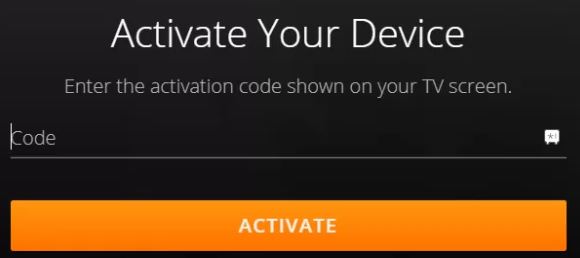
- Now select the Register Option, Enter the details asked, and create Crackle Account.
- Use these Credentials to complete the Activate procedure.
Now the Crackle app on Roku refreshes and lets you access its content. Select the movie or show you want to watch and live-stream it on your device. You may also like to learn about How to Watch TinyZoneTV on Roku?
How to Cast Crackle on RokuTV?
If your Roku devices have firmware lesser than version 8.1 or are not compatible with the Crackle app. Casting or Mirroring Crackle App from its other supported devices to your device-connected TV Screen or your TV screen is the only way to watch Crackle on Roku. It is easier to cast or mirror from Smartphone to Roku. Since the Google Home app is available for both Android and iOS devices, you can use it to cast your Smartphone screen with Crackle onto your device screen easily.

How to Get Crackle and Google Home on Smartphone?
- Turn on your Smartphone and launch the default Google Play Store or Apple App Store application.
- Go to the search bar and type “Crackle” and press OK to start the search.
- Select the Crackle app from the results to reach its information page.
- Tap on Install or Get option and wait till Crackle is installed on your SmartPhone.
- Go back to the search tab and type “Google Home” and search for the app.
- Tap on Google Home and reach it app details section.
- Now select the Install or the Get option to get Google Home on your device.
How to Connect Roku to Google Home App?
- Connect Smartphone and Roku device to the same WiFi network.
- Launch the Google Home app on your Smartphone.
- Select the Plus icon and choose the Set up device option.
- Now tap on Works with Google and select the Magnifying Glass icon and type Roku.
- From the list of devices select your Roku device name.
- Sign in with your Roku credentials when prompted and select Continue.
- Roku device is added to the Googel Home app on Smarphone.
How to Cast Crackle from Smartphone to a Roku TV screen?
- Close the Google Home app and open it again on your Smartphone.
- Tap and Hold the Roku device tile on the Google Home app.
- Tap on the Cast Option and select Cast screen.
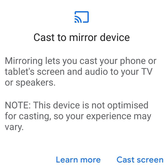
- Your Smartphone Screen is now cast to your Roku device screen.
- Launch the Crackle app on your Smartphone and Watch it on your device.
You may also like to learn about How to Watch Crunchyroll on Roku?
What to Watch with Crackle on Roku?
Crackle is part of Sony Network, which offers free movies and shows. You can watch TV Shows like The Chosen, Sherlock, Line of Duty, Silent Witness, Hells Kitchen, Forensic Files, and more. With Crackle on Roku, you can also watch movies like Train to Busan, Highlander, I Saw the Devil, Troll Hunter, All Quiet on the Western Front, and more.
THE END
With the procedures given in this article, you can easily watch Crackle on Roku using one way or the other. If you have a problem accessing the Crackle application, make sure your device and app are updated to their latest versions. Having a good internet connection is mandatory for buffer-free streaming on Crackle.
Frequently Asked Questions:
Is Crackle on Xbox One?
Yes, you can install the Crackle app from Microsoft Store on your Xbox One Game console. After installation, you need to Activate Crackle on Xbox One with its account credentials at crackle.com/tv site.
What are the devices that support the Crackle App?
You can access the Crackle app on devices like Amazon Fire TV, Fire TV Stick, Android Phone or Tablet, Apple iPhone or iPad, Android TV, Apple TV, Chromecast, LG TV, Samsung TV, PS4, VIZIO TV, Xbox One, and Roku.