
Canceling sling tv is very simple and convenient. If the user wishes to cancel Sling TV before the trial period or either thinks of a better alternative or wishes to cut off services before getting charged for next month. In this case, the users can follow these simple steps to uninstall these services by simply logging into their existing accounts.

Table of Contents
How to Cancel sling tv?
Just follow this simple step-by-step procedure to cancel Sling TV
-
- Visit the “Sling TV” website.
- Access your “Account.”
- Select “Cancel”
Visit the Sling TV website:
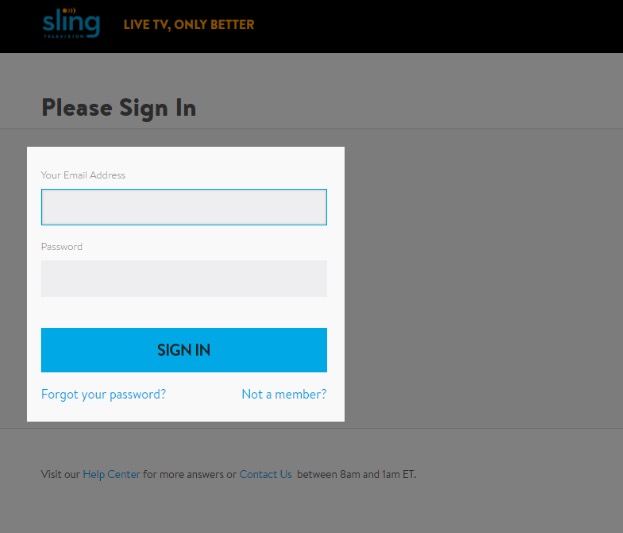
Visit the Sling TV official website (www.slingtv.com) on any of your electronic devices. If you are already a user, you can sign in using your mail-id and password, or else users can create a new account to sign in. Users will have two options to sign- in according to the user’s browser settings.
There will be a symbol that resembles a little human in between the user’s language and sign-out.in case the users feel difficult to find their account menu, then click the settings cog-wheel in the top-right corner.
Related Post: How to Watch Bally Sports on Apple TV?
Access your account:
After successfully signing into their account section, users can easily manage their account for everything like billing, subscription, etc., and Users can also find information regarding their next charge, free trial period,auto-renewal date, and time. By clicking on the manage account option, users will be directed to the My Account page on Sling’s website.
Select cancel:
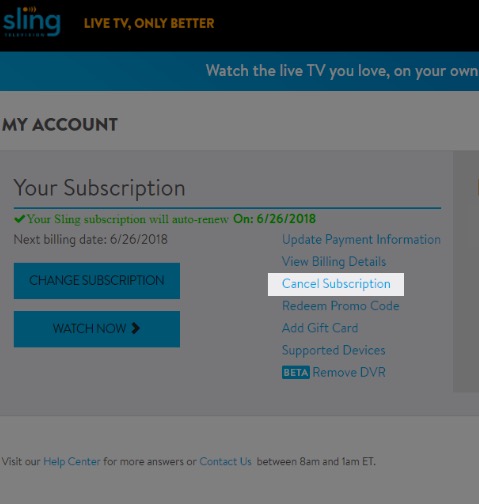
- Users can find a pop-up menu option that appears in the account section in which the user has to confirm that they want to keep or cancel the Sling TV subscription. Users will also be given some incentive to stay by Sling TV.
- It fully depends on the users either to cancel their subscriptions or continue. Many users have found incentive offers like HDTV antenna and much more.
- Sling TV will give users different deals to stay on for at least another few months. Some users prefer the deals offered and others stay on their decision of cancellation.
- If the users wish to cancel Sling Tv, then they have to select the cancel option in which they have to click cancel the subscription. Setup Chromecast to Work With Sling Tv

How to Cancel Sling TV by using a Phone?
Here, in this part of this article, let’s get the information to cancel the subscription by contacting the customer service center of Sling TV.
- If you want to cancel the Sling TV service by using the phone, then you have to call the respective customer service number is 1-888-291-5217.
- Then you have to say your ID to cancel your membership.
- If they cancel your subscription, then you will get a confirmation email from the respective customer service center.
- Atlast, your subscription is canceled.
How to Cancel Subscription to Sling TV?
If you want to cancel the subscription to Sling tv, then you have to click the subscription option and direct to select the service you have, then press the cancel button. Why did we cancel the Subscription to Sling TV? Let’s get the reason we mentioned below.
- If sling TV lost some shows and channels.
- The cost of the subscription package is too high.
- Suppose you find some other better offers else.
- If you are facing some technical issues.
Stay with Sling TV
- Users will be asked to stay on and get more offers. If the users still want to continue with cancellation, then the Sling TV team will put forth some questions to the users regarding the cancellation.
- Users will have to face questions like why they would like to cancel.
Is this possible to stream Sling TV after canceling the Subscription?
To be sure, you can stream all your Sling TV content after canceling the subscription. How is it possible? Yes, you can watch the content at the end of your renewal date. If you want to cancel in the free trial period, then your programming will get terminated immediately.
How to Cancel Sling TV from Different devices?
If you need to cancel the subscription from various devices, then you have to read the upcoming section and know the solution to cancel the Sling TV service.
How to Cancel Sling TV on Roku?
- First of all, you have to move to the Roku Home page and click the home button by using your remote.
- Then you have to move to the streaming channel from the menu.
- Navigate to the Roku Channel Store and find the Sling TV in the search menu.
- After that, click the sling TV option and Hit the OK button.
- You have to select the Manage subscription option.
- Click the cancel subscription. Once again, click the subscription option to confirm to cancel it.
How to Cancel Sling TV on Amazon TV?
- Initially, You have to launch your Amazon account by signing in to your account with the required details.
- Further, move to my account option and then move to the Dashboard of my account.
- Navigate to the subscription page of my account.
- Then find the sling TV from the subscription list.
- Click to cancel the subscription of the sling TV and click to confirm the cancellation.
- Then you have to receive the mail. To cancel the subscription.
Wrapping Up:
After giving valid reasons for cancellation, users can go to the bottom of the page to answer the question “How likely they will return?” and click the continue option. Users will get a reminder to re-subscribe another time. After, those users will be prompted to enter the Sling TV password for the verification process.
Next, after the successful verification process, proceed and click on the Cancel My Subscription option. Users will see a reminder message to re-subscribe at any time and also a confirmation of the cancellation.
Most Related post: How to Get Redbox on Apple TV?