
You have Zoomed in mistakenly but you were not able to find how to Zoom back. Dont worry, you are in the right place I will guide you. In this article, I will guide you on How to Zoom Out on Firestick? Using the remote is a simple way and fastest way to get out from the Zoom option on the Firestick device.
Amazon fire stick has millions of features, that help users who have difficulty seeing the screen on the default Zoom level. Thus without wasting time let’s Jump into the article for solving the Zoom issues
There are some alternative ways to Zoom out on an Amazon Firestick device. You guys can follow any guidelines which I have given below. You can take any one way to solve the problem. Before getting into the guideline you should know that the remote has a Keystroke combination on the remote.
Table of Contents
How to Zoom out on Firestick?
There are many alternative ways to get Zoom out from the Firestick device. Now we going to see the first method to Zoom out on Firestick. The first method is using Magnification Feature settings.
Magnification feature settings:

This is a basic feature that gives default by Firetick device. This feature is designed for people with poor eyesight. It’s very easy to use. The steps are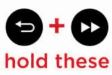
- Keep pressing the Back and Fast Forward buttons on your Firestick remote together for 5 seconds.
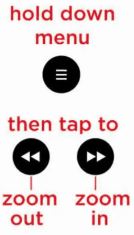
- Next press the button and press the play button to Enable/Disable the Zoom.
If you guys don’t have Firestick remote, don’t get worried. You can use any Bluetooth Keyboard to access the Firestick accessibility System. Also, you can pair the game controller to access the Accessibility settings.
Read also: Is Barbie on Firestick?
Zoom out on Firestick using Calibrating Display Settings
This is simple and easy to use, you just adjust the settings. You just try these steps to fix the problem. The steps are
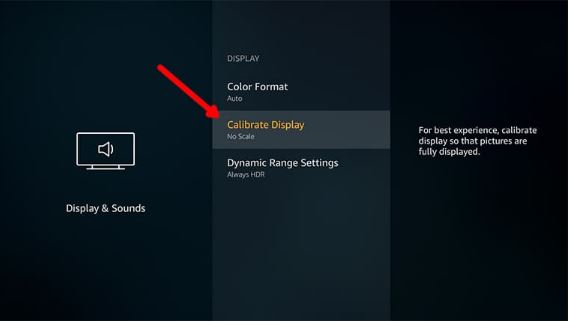
- Click on settings
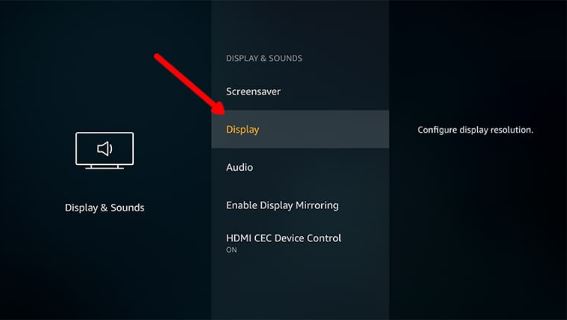
- Press the display and sound tab
- Click on display
- Choose Calibrate Display.

- Just click adjust button and adjust the display by using the up and down regulator on your Firestick remote.
- Adjust the screen now, if you adjusted the screen select accept.
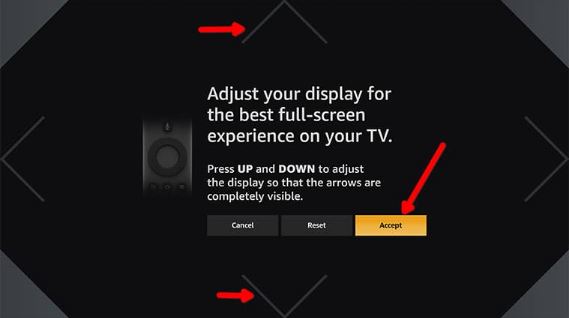
- You will get back to the display settings page and now you come back to the home page on the Firestick device.
- Now you can enjoy the visuals on a perfect screen and enjoy the streaming.
You can fix the zoom-out problem in these steps. Still, you are facing a problem? Dont worry. You can fix the problem by using upcoming strategies.
Try Kodi Accessibility zoom
If you are already installed the Kodi app, you can fix the problem. This method will work on any kodi version. The guidelines are
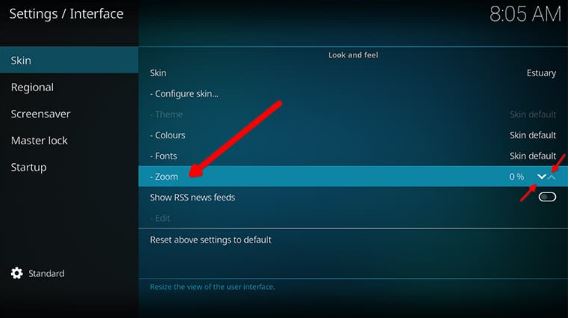
Launch Kodi >> Open Kodi >> Go to settings >> Click on the interface option >> Select the Zoom tab >> Adjust the Zoom option.
Thus these are very simple steps used to fix the Zoom out on Firestick but the only thing is you should have the Kodi app. Now you can enjoy the Visual streams.
Refer also: How to Get Zoom on Google TV?
Reset your Firestick device
Still, you guys are facing the problem of Zoom out on the Firestick device. Dont get disturbed, You can fix this problem on Zoom out on Firestick. You just switch off the Tv and plug out all the internet connection and just rejoin the Internet connection and log in to the Firestick account. Now you can enjoy the visuals with the correct display.
Conclusion
This article is for everyone who accidentally got their Firestick device Zoomed in. If you have tried these four steps but still got stuck in a problem, It’s time to go for the last resort. You can just get in contact with Amazon Firestick Team. You can go to the web browser and find the original website of Amazon Firestick. And on that Webpage, you can see the contact us on the downside of the page. You can contact the team. Now you can fix the Zoom out on Firestick by following these steps. And you can enjoy the streams and visuals on Fioresdtick with the correct display. Dont forget to ask any questions you may have about your Firestick!