
Frndly TV is the best Live TV streaming service application and you can be able to watch shows and programs. If you want to know How to Watch Frndly TV on Firestick? This is the perfect guide for you. We will explain all the possible ways and related information to get a Frndly TV on your Firestick Device.
Whereas Frndly TV is an American Streaming television network that gives many Channels, Movies, Shows, and TV programs. Nearly it provides more than 40+ Channels. And the single streaming service reached the Subscriber was 500,000. Eventhough you can get a variety of Movies and shows Channels as Classic Movies, Entertainment Channels, Documentaries, and Trending Shows.
Table of Contents
Highlights of the Frndly App on Firestick
- It will allow you to record Live Tv shows and programs.
- Frndly TV offers a large library of shows, events, Movies, and TV programs.
- Moreover, it is a user-friendly interface.
- The most exciting feature of the frndly TV app is detailed schedules such as timing and Shows name. So that, you cannot able to miss your favorites.
- Also, it has a search tool option, to find your favorite shows easily.
Can I get Frndly TV on Firestick?
Definitely, you can get a Frndly TV on your Firestick Device directly from the Amazon app store. You can many Top popular Channels such as Hallmark Channel, UPtv, Game Show Networks, and More. But Frndly TV doesn’t provide a Local Channel Networks. Most important, this is a subscription-based streaming application. In addition, it gives Live TV shows and programs. Also, gives on-demand Videos.
How to Watch Frndly TV on Firestick?
The Frndly TV is Natively available on the Firestick so you have to install the application in a direct way. If You are a United States citizen then you won’t choose the Sideloaded method or any other method. You can download the application from the app store.
The steps are:

- Select the magnifying glass icon from the Home screen of Firestick.
- Swipe down and choose the Search input box.
- Then you have to enter the Frndly TV in the search bar and click to find it.
- Hit the application from the suggestion list.
- Click the Download button.
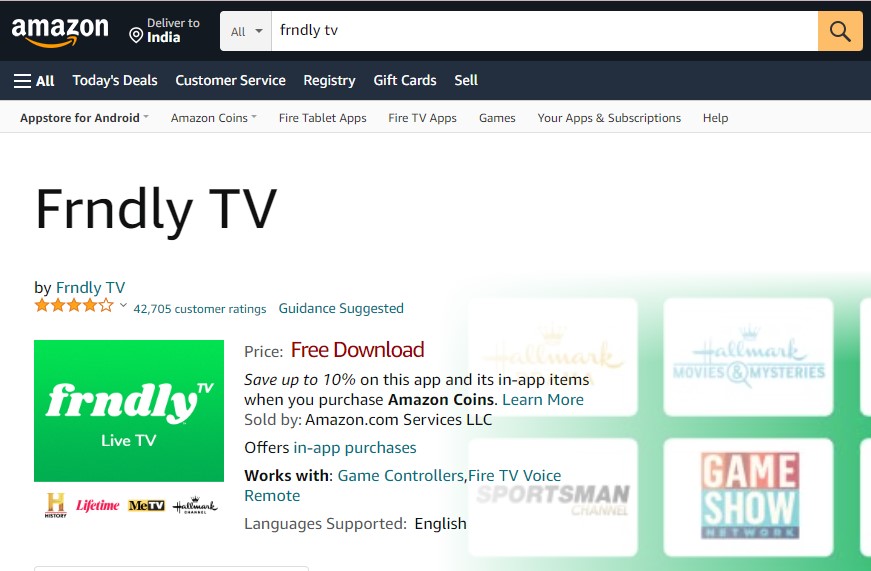
- If the application is installed then you have to activate the application and then you can be able to stream all your favorites.
Check the Post: How to Install Now TV on Firestick
Activate the Frndly TV on Firestick
Once you installed the Frndly TV app then you should activate the application to access its content. Getting the shows, movies, and programs only after you activate the application.
The steps are:
- Open the installed application. and the screen will show the activation code. Note it down.
- Then you navigate to the browser on another device such as a PC or Smartphone.
- And search for the site to activate the Frndly TV app.
- After getting the site then you have to enter the respective Channel code.
- Once the application verifies your code and it gives access to stream its content.
How much is Frndly TV Subscription on Firestick?
Frndly TV is a Subscription paid Service so only you can stream the content along with the subscription. Totally the Frndly TV has three types of subscription.
There are:
But you can get a Frndly TV that offers a Free Seven-days in all these packages. If you feel uncomfortable with this service then you can cancel it within seven days before you get Charged.
Also, Read How to Install TVision on Firestick
How to subscribe to Frndly TV on Firestick?
You can subscribe to Frndly TV through their website on any web browser by using a PC, tablet, or Smartphone. Here are the steps to subscribe to the Frndly TV on Firestick.
- From the Home screen of the Frndly TV, press the blue Watch seven days Free button.
- After that, you have to select the Plan from the subscription choice, then you have to Hit the Continue button.
- Then it will ask you for the monthly or annual subscription plan.
- Once you complete the process then you have to get a notification to purchase the service successfully.
Alternate Way to get Frndly TV on Firestick
Here we mention the alternate way for the Non- US Citizens because they can’t get the Frndly TV application on the Amazon App Store. For This reason, You have to install the Third-Party application to get the Frndly TV on Firestick. We have the steps to watch Frndly TV on Firestick by using a Silk Browser. Most Important, you should install a VPN server and connect to the United State Server and get the Frdnly TV application on Firestick.
The Steps are:

- Initally, You have to Launch the Firestick Home page.
- Click the Find menu option. Following this Press the Search option Menu.

- By using the Search bar type the Keyword “Internet Browser” and choose the application from the suggestion list.
- Press the download symbol and you have to wait until the application gets installed.

- If it is completed then you should open the application and click the Accept Terms option.

- In-built the Bing.com tab will open automatically.
- Now you have to enter the URL in the field and click the Go Button.
- Once the process is done then you should select the Free trial days offer and choose the subscription and watch the content.
Additional Info, How to Download Soap2day on Firestick
How to Use Frndly TV on Firestick?
The Frndly TV has some procedures to use Frndly TV on Firestick. Once you activate the application then it is easy to access the application on your Device.
- First of all, you have to click the Home button by using your Firestick Remote and then Tap the Apps section.
- You can also able to move the application to the home screen to access it easily.
- Open the application.
- If you Open the application for the First time means it will take some to open on your Device.
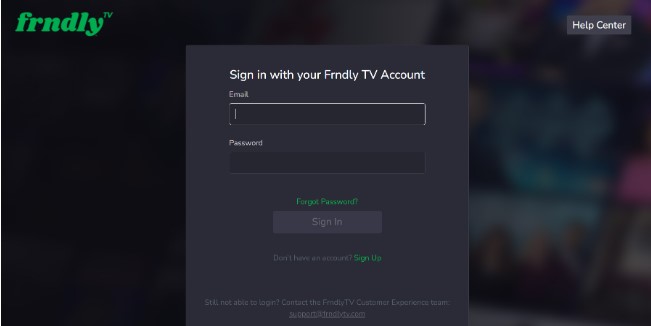
- Once it opened then sign in with information such as Email, and password.
- The Next page will show you the categories, Channels list, and its schedule of timing and date.
- Now you can select the Channels and Live shows, Movies which your want to stream click the option, and watch Frndly TV content on the Firestick Device.
Final Words
In Short, We Mentioned the information and steps to watch Frndly TV on Firestick. Also, we included the alternate Way for the Non-United State Users. And we included the procedures to use the application on the Firestick. Refer to this article and collect all the valid points for you. We hope you like this article. If you need any information related to this article. Let me know in this comment portion.