
Firestick is a streaming device that allows users to stream movies, TV shows, and entertainment content on the big screen. There are many streaming services available in the Amazon App Store to get to stream on Fire TV connected with your smart TV. TVision is also one of the live-streaming platforms that offer to stream sports, news, and so on. If you are looking for How to install and stream TVision on Firestick. Then this guide will lead you to get the answer.
TVision is a streaming platform that allows streaming your desired content as a live TV stream. From this app, you can watch all live TV content, including sports and news. However, it is a subscription-based one, and it offers various genres to stream on your compatible device. On the other hand, TVision has developed a TVision app, which is made as a category to stream easily to their users.
This app is mostly available on many streaming devices, such as Apple TV, Amazon Fire TV, Google TV, Android TV, Chromecast, Roku, and Android and iOS SmartPhone. Besides, it offers three different packages to stream, and it may be classified as its channel count. You can choose your plan according to your preference.
Accordingly, it is a subscription-based service to stream its live content, and you can choose any of the plans to live stream sports and news as well as on-demand content similar to Netflix, Hulu, and so on. Fire TV is a great streaming device that allows you to stream on-demand and live TV content.
Let’s dig into the further process to know the subscription pricing to stream the TVision app’s content on your Fire TV.
Table of Contents
Pricing for TVision:
- TVision Live TV – It offers more than 30 channels to stream along with three devices to stream at the same time. The subscription costs $40 a month.
- TVision Live TV Plus – Allows to stream more than 40 live TV channels along with on-demand content. Subscription cost starts at $50 a month.
- TVision Live Zone – It offers over 50 TV channels to stream along with on-demand content with various categorized content. A subscription costs $60 a month.
Can I Get TVision on Firestick?
Of course, you can install and stream the TVision app on Amazon App Store from Fire TV. Since it is available on your app store, so you get the app to stream its content without any hassle.
How to Install TVision on Firestick?
From this guide, you can watch TVision content on the big screen by subscribing to its service. Get into the installation process to stream TVsion on your Fire TV screen using these steps.
- Enter the main menu and get into the Find menu.
- Then, tap on the Search icon and look for the TVision in the search field.
- Get into the Apps and Games menu under the app store.
- Choose your TVision app from the search result.
- Now pick the right app to install on your Fire TV by hitting the Downlaod or Get option.
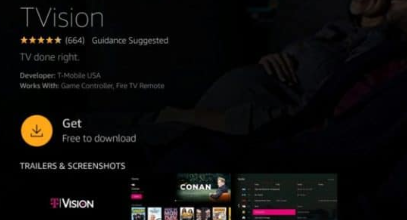
- Once the app gets downloaded on your Fire TV, hold and hit the home button.
- Now choose the Apps icon on the screen.
- Again press and hold the TVision file for a few seconds and then place it where you want.
- Place the TVision under the Apps and Channels section.
- After opening the app and then, you should require to activate the account by entering the official site from your browser.
How to Activate TVision on Firestick?
Once you get installed the app on your Fire TV, then you should need to activate your account in order to stream its content on your compatible device. For that, you should follow the given below instructions to activate TVision on Firestick.
- Firstly, enter the TVision app from your Fire TV.
- Further, visit the official TVision activation site from your browser.
- And then, proceed to the login page associated with your T mobile credentials from your SmartPhone or Windows.
- Generate for activation code, and It will show you a code on your SmartPhone or desktop screen and note it down.
- Now input the six-digit activation code on the respective field.
- That’s it. Now your TVision app is activated on your Firestick.
- Now you can start to stream its content on the big screen with a great streaming experience.
Other than Fire TV, the TVision app is widely available on most devices, and you can able to install and stream its content on Google Chromecast, Windows, Android TV, Apple TV, LG Smart TV, Samsung smart TV, Google TV, Android, and iOS SmartPhone.
If you are looking for a way to install and stream the TVision app on other compatible devices. Then get into the steps of the installation process from below.
How to Get TVision on Android TV?
- First of all, get into the official Play Store from your smart TV.
- Look for the TVsion app using the Search tile.
- Tap on the right app from the search result.
- Tap on the TVision app to install it on your Android TV.
- Launch it once the app gets installed on your TV.
- Open it and then proceed to the login information.
- That’s it. Now you can explore its content on your Android TV.
Get TVision on Apple TV:
- Avail of the app store and then look for the TVision app.
- Choose to install the app, and then it will start to download on your Apple TV.
- Move to the app folder from the main page and then open it.
- Further, proceed to sign in and then enter the valid credentials into the respective field.
- Now you can explore TVision app content on your Apple TV.
Closing Off:
To conclude, here we mentioned the TVision app to install and stream on Firestick. It is easy to download and install on your Fire TV device since it is available on the Amazon App store itself. And also mentioned the activation process to stream its content on your Fire TV-connected TV. Otherwise, you can watch its content on your Apple TV, Google Chromecast, Android or iOS SmartPhone, Google TV, and Android TV. If you have any issues while streaming its content on your Fire TV, let me know in the comment section.