
![How to Fix Hulu Error Code 503 [Windows]](https://techthanos.com/wp-content/uploads/2023/01/How-to-Fix-Hulu-Error-Code-503-Windows.jpg)
When you are watching Hulu on your PC or Laptop Web browser, you might sometimes come across the Hulu Error Code 503. This error occurs when there are errors on Hulu Server. If you think you are missing out on the live event you planned to watch on Hulu, check this article to fix this error quickly. This HTTP Status error code 503 is caused on most platforms like Windows, Android, Linux, Mac, and more. Find out the causes of Hulu Error Code 503 and learn the steps on How to fix Hulu error code 503 on your device.
Table of Contents
What Causes Hulu Error Code 503?

As discussed above, the main cause for Error Code 503 to occur on Hulu is Server Error. Whenever the server fails to connect to the Hulu database and is not able to complete your request, this error code appears. You can also see this error code during Server Maintenance and while there is high traffic on the server. Except for Server Maintenance, you can try out the easy and simple Fix methods, which can be used to solve the Hulu Error Code 503 issue.
NOTE: The Error Codes similar to 503 are 500 and 504. You can use the same methods discussed in this article to fix all the above-mentioned Hulu Error Codes.
You might also need to learn about How to Fix Hulu Error Code P-Dev320?
How to Fix Hulu Error Code 503?

Now that you are facing Hulu Error Code 503 on your PC or Laptop, it is time that you fix this problem and go back to your happy streaming time. Follow the methods in the given order to reduce your time in the process of fixing this error code.
NOTE: Make sure that your PC or Laptop is connected to the internet is working properly. If not try to connect to other sources of internet like your personal hotspot or other WiFi networks.
Refresh Hulu Site and Restart Browser:
In case of temporary server problems, you can do a page refresh on your web browser and get the Hulu server back. Sometimes glitches on your device can cause errors that make it impossible to access the Hulu server. At times like this, you can restart the browser and try reaccessing Hulu.
Refresh: The simplest shortcut to refresh your web page on your browser is by clicking the following keys on your PC keyboard, Ctrl + F5.
Restart: Close the web browser on your PC and perform either a Restart or shut down and start the system again. You can also restart your Router and Modem at the same time.
Open a web browser on your PC after restarting it and access Hulu on it. You can find that the server is working fine and then go back to enjoying your live streams. In case of Hulu Error Code 503 is not being fixed, try out the next method.
Check Hulu Server and Subscription:
To find out if the Hulu Error Code 503 is due to its server being down, check the Hulu website on other web browsers on your PC. If not, call your friend who is using Hulu can confirm if the server is down or not. You can also use sites like DownDetector, IsItDownRightNow, etc., to check the status of the Hulu Server.
Sometimes, your subscription plan being out of date can block your account’s access to the Hulu server and display Error Code 503 when accessing it. Check your subscription package expiry date, and do not make multiple orders making Hulu unable to work.
Clear Browser Cache and Resolve DNS Error to remove Hulu Error Code 503:
You need to free up the Cached memory of your browser to make it faster and to work without any errors. Cache memory stacked up might also be one of the reasons for Hulu Error Code 503. Since the most used web browser is Google Chrome, let’s get to the steps to clear the cache on it,
- Go to your Chrome Browser Menu by pressing the three vertical dots icon.
- Tap on the More Tools option and select Clear Browsing Data.
- Choose the Range to be All time and check the box with cached images and files.
- You can also check the boxes with Browsing Data along with Cookies and other site data.
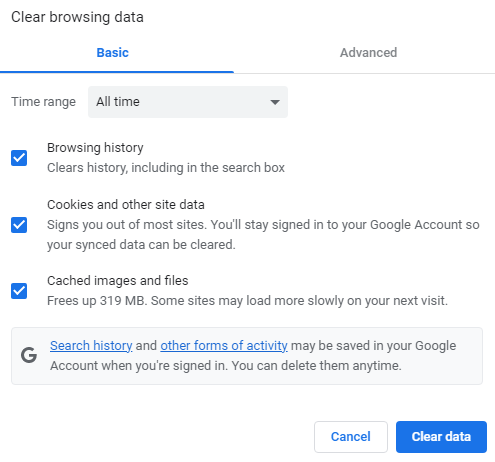
- Now tap on the Clear Data option to clear your browser cache memory.
You can now restart your web browser and try to access the Hulu website. This will solve the Error Code 503 caused due to the cache memory being full.
If you are accessing a web browser with incompatible DNS settings, you will now be able to access the Hulu website. To resolve DNS errors on your PC, you can follow the simple steps carefully,
- Open Administrative Command Prompt on your PC.
- Now enter the command “ipconfig/flushdns” and run the command.

- Wait until the “Successfully flushed the DNS Resolver Cache” message.
- Now go back to your web browser and access the official site to find that the Error Code 503 is gone.
You might also need to learn about How to Fix Hulu Error Code P-Dev320?
THE END
Suppose you have tried out all the methods mentioned in this article and still get Hulu Error Code 503. Then the last step would be to contact Hulu Support. You can directly make a call to Hulu from the telecommunication numbers provided at its official site. You can also visit the Hulu help center and try out the methods provided there to resolve the error code.
Frequently Asked Questions:
What is Error 400 on Hulu?
If you have any issues with your Account, Hulu will flash Error Code 400. It is advisable to call the Hulu Help Center to solve this issue on your device.
Why is Hulu not available outside of the US?
Hulu geo-restricted its service to the US. Sometimes, you cannot even play region-locked content in other parts of the US when there is no authorization. To use Hulu outside of the US, you can use a VPN service and change your location, and access Hulu on your device.