
Suppose you are tired of staring at your TV screens and waiting for the Virgin media error, c133, to resolve. Trust me, guys, that staring will not help. But we do have something that can help you. Is anybody there going to guess what that is? Do not worry and keep stressing your brain, as I know the error must be freaking you out. So the only thing that can save you is Me (i mean this article ). Keep reading to learn How to solve Virgin Media Error Code C133.
Table of Contents
Virgin Media Error Code C133:

As unexpected guests don’t give you joy, unexpected errors are something that does the same. When you have just arrived home, landed on the couch, and started watching something good on virgin media. It suddenly betrays you with a pop-up message on the screen saying; There was a problem connecting to the virgin media service. To be honest, it pisses us off.
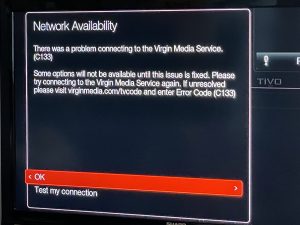
The virgin error code C33 usually occurs with channels not displayed, total outage of the channels, and a pop-up message on the screen. This error refers to there is a total blackout of the channels as the services of virgin TV are probably down. Some users can view only a limited number of channels, whereas others experience complete blank screens on virgin TV. While facing scenarios like this, you just need to use the guide below to resolve the problem.
Virgin Media Resolving the Virgin Media Error Code C133:
If you are experiencing blanking out on screens and not able to view any channels, then it is because the servers of virgin media are down. It is sure that virgin media is aware of that and is already trying to resolve the issue to provide the users with their favorite channels back.
To know if the virgin media services are really down, you can try these two ways.
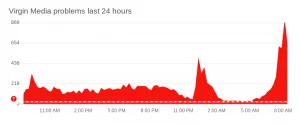
a) Visit any app that provides real-time information on the status of various services online. These apps report problems, identify outages, and serve down information to provide details about the current situation of the service.
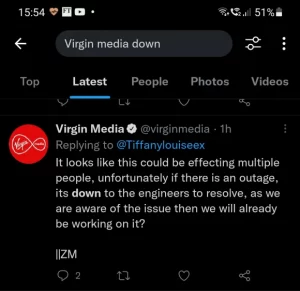
b)As I told you, Virgin media will be aware of the current outages and errors; you can try checking the Twitter account of the virgin media service to find out if there is any issue and when it is expected to resolve.
After virgin media has resolved the issue, it is recommended to follow further steps in order to get back on the channels.
Read: Mobdro not Working Issue
How to Solve Virgin Media Error Code C133:
We can feel how frustrated you must be feeling when your TV service is not available and all of a sudden goes down. But you have to be a cool head and think of solutions to solve the problem. And to help you in the process, we have provided you with a guide that will help you deal with the Virgin media error code C133.
Reboot the Virgin Media Set Top Box:
The first thing you should always give a try on the first attempt to solve any issues on the device is rebooting the device. To reboot the TV,
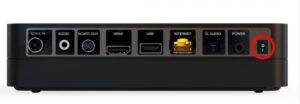
- At the back of the TV box, you will find a switch.
- Switch the flip to the OFF sign.
- Wait for some time and flip the button ON.
- The welcome screen of the TV will appear.
Try Reconnecting to the Virgin Media services :
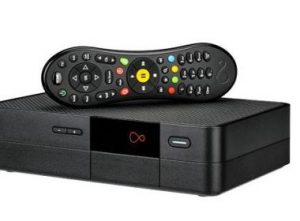
Despite rebooting the device, if the problem persists. Try reconnecting to the virgin media services. To do that, follow these simple steps.
- On the TV screen, Go to the Home button.
- Choose help and settings.
- Click on the settings button, select Network, and press Connection in progress.
- Now click on GET status or Connect to the virgin media service now.
Resetting the Virgin Media TV :
This step is called the factory reset of the TV .sometimes, when a TV shows, an error occurs, it may be due to some glitches in the device, and to remove those glitches, a factory reset can be done. The following steps will Reset the TV.
- With the help of the remote, Select Menu.
- Go to the Settings.
- Scroll down to select Advanced settings and press OK.
- Choose the Virgin TV box and click OK.
- An identification number is required – try 0000.
- Answer YES to keep the existing recording and press OK.
- To factory reset the TV, Choose the Reset to Default option.
- Choose the language and reinstall the Settings of the TV box and wait till the process is completed.
There is high chance that a factory reset will solve the Virgin Media Error issue, and you can continue watching.
Also: “Airplay not Working on LG Smart TV”
Check the Cable and Wifi Connections :
A Bad or wrong connection to the TV box can also result in the disruption and occurrence of the error code C133. You have to make sure the cables are connected properly. Follow the instructions below to make sure that the ethernet and HDMI cables are connected at each end without any mistakes.
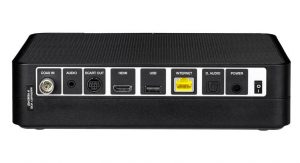
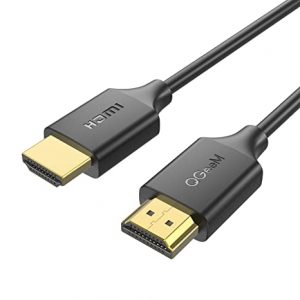
- Connect the adapter and one end of the ethernet cable to the TV box.
- The remaining end of the cable is to be connected to the TV hub.
- Connect the virgin TV box and the TV using an HDMI cable.
Also, check if any of these has resulted in the error.
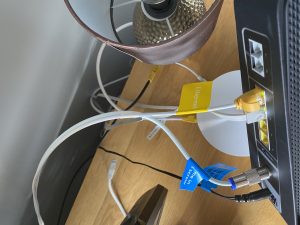
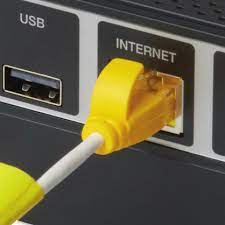
- Whether the cables are broken or frayed.
- Check if the set-top box and router are connected.
- Try rebooting the virgin media router.
To set up a proper wifi connection :
- Click on the Menu button.
- Go to the settings >Home Network Settings.
- Press OK.and click on the Set up Your home network.
- Choose the preferred network by clicking on Join Network.
At Last, when you are done trying everything, and still it shows the same error, then only one way is left. Find below.
Contact the Virgin Media Customer Care:
Customer Care Service is a lifesaver when you deal with any sort of technical issue. They are in charge of helping you through any sort of problem. I know you might be wondering why have i made it so far to tell you this simple thing. It’s because I wanted you to try. and Voila, if you have found a way and if not, then customer care is your last hope.
Contact Virgin TV customer services by visiting the Help and Support Page on their official website. The Virgin TV engineers will head directly to your place with tools to solve the problem. Pick up the Right category of your TV and describe your problem so that the service will be available in time.
Similar Post: How to Fix Netflix Error Code HTP-998?
Final Words:
We already told you, you will have to have the patience to perform this process to solve your Virgin Media Error Code C133 issue. You can watch your favorite shows back on your TV again. Follow the steps carefully and say Bye bye errors and Hola to watching TV shows. Woohoo, lovely wits, if you have resolved your issue of virgin media error. Until then Adios amigo.