
Xbox One is one of the most recommended gaming consoles preferred by gamers to play all games. In addition, the users can install and download apps to watch all live and on-demand programs. Therefore this article will help you with How to Download and Watch Hulu on Xbox One.

Table of Contents
Hulu on Xbox One
Xbox One supports various apps to watch live TV channels. Likewise, with the help of the Hulu app, watch live and on-demand content on Xbox One. In such a way, this application streams more than 75 channels without the need for any cables. The first thing to be said about Hulu is it is a top trending streaming Platform available only in the United States of America. To get them, all you need is a monthly subscription which offers a wide range of original content. In the below section, we have added all types of subscription costs.
Subscription Cost of Hulu
Currently, the available streaming plans for Hulu are Four, and they are:
Hulu Basic
- It costs $6.99 per month
- And it costs $69.99 per annum
- It costs $12.99 per month for the one that includes No Ads
Hulu+ Live TV on Disney Plus and ESPN+
- Costs $69.99 per month
- Hulu+ Live TV on Disney Plus and ESPN+ includes no ads for the cost of $75.99 per month.
In addition to that, all the regular add-ons packages are for costing:
- $14.99 per month>>HBO Max
- $9.99 per month>> Cinemax
- Starz>>$8.99 per month
- Showtime>>$14.99 per month
Along with that, it allows the subscribers to cancel their Hulu Subscription whenever they want. The free trial option is not available on Hulu for Live TV plans. These are the subscription costs of Hulu on Xbox One.
How to Sign Up for Hulu?
Since it is a long process to Sign in via the Xbox app directly, the users can create a new account using any web browser on their preferred device. And the process is given below:
Step 1>> Launch the Web Browser
Create a new account using any web browser and enter into the official website by applying the link hulu.com on the search field. Once after hitting the Go button, you will be taken to the home page of the Hulu app, where you can choose the Signup section.
Step 2>> Choose your preferred plan.

On this screen, the page shows you all the available subscription plans for the users to pick their preferred one. And once selecting the plan, tap on the Select option to move on to the further process.
Step 3>> Create a new account.

Now fill the given boxes to create a new account on Hulu, and once providing the details, jump on to the payment method to complete the process.
Also, read – How to Watch Discovery Plus on Xbox One?
How to Download and Install Hulu on Xbox One?
In this section, we will guide you on how to download and Install Hulu on Xbox One. And before jumping on to the Installation, as we said, you need to create an account for that, so refer to the above section to create that one. Here there are two simple ways to download Hulu on Xbox One and they are:
- Directly Download Hulu on Xbox One
- Install Hulu on Xbox One remotely
1. Directly Download Hulu on Xbox One
It is recommended to kindly follow the steps to Download Hulu on Xbox One directly.
Step 1>> Specify the App Store of Xbox One.
Begin the process by getting into the Dashboard of Xbox One and specify the App Store.
Step 2>> Browse for the Apps.
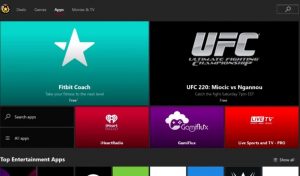
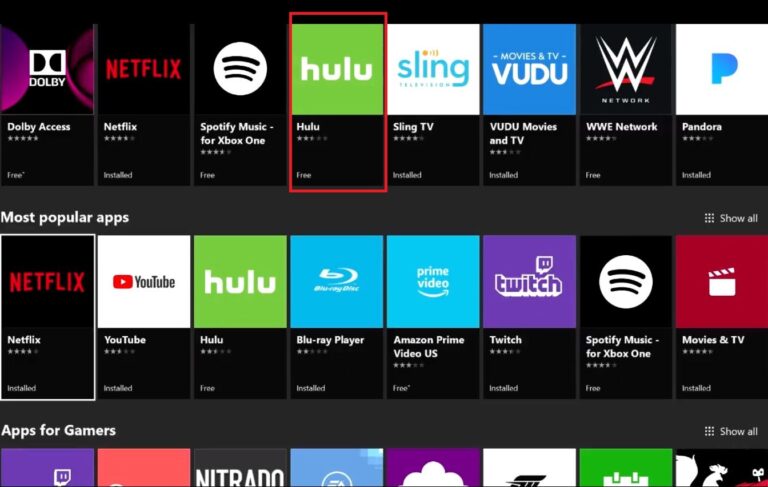
Now at the top of the dashboard, move your cursor to the search field and browse for the apps. Then under the Apps section, where you can find and search for Hulu. And then tap on the Get to install button to download the respective app.
Step 3>> Launch the Hulu app.
Upon the successful Installation of Hulu, then on the Xbox One Controller, press the Xbox Button to launch Hulu on Xbox One.
Step 4>>Sign in
Once launching the app on your Xbox One device, then move on to the Sign-in page to make the subscription. Find you can get the Hulu app under the section “My Games and Apps” on your Xbox One device.
Also read – How to Get Just Dance on Xbox One?
2. Install Hulu on Xbox One Remotely
In the previous method, we have given the direct method. Here, use this method to download the Hulu app on your Xbox One Remotely.
Note: Do this process by enabling the remote feature and Instant-on. Then sign in to the same Microsoft account on your Xbox One and PC. And kindly note that the device will not download any app if Instand-on is not enabled.
Step 1>> Microsoft Store.
Initially, start up the process by accessing the Microsoft Store using any web browser or an app.
Step 2>> Search and Find Hulu.
Now inside the Microsoft Store, search and find the Hulu app. Tap on the option to select and install the app by specifying More Options.
Step 3>> Launch Hulu.
Now tap on your Xbox One device and click install to complete the process. Finally, launch Hulu to start streaming Hulu on Xbox One.
How to Watch Hulu Outside US?
Since Hulu is only available in the United States, People outside the US can now watch Hulu by subscribing to a premium VPN such as ExpressVPN. Once subscribing to VPN, move on to the application and connect them to the US server. By doing this, all the users can be able to watch Hulu from elsewhere.
Install Express VPN>>Launch>>Log in>>Go to My Account and Select Mediastreamer>>Copy the DNS Address>>Set up proxy>>select the US server.
Steps to Fix Hulu on Xbox One not working?
Try out these solutions to fix Hulu not working on Xbox One
- Restart your device(Xbox One)
- Make sure whether you have a high-speed interment connection
- Look at your subscription to check whether you made it properly
- Uninstall and Reinstall the Hulu app
- Update the app
- As a last option, try to send Hulu a Report
Also, read – How to Stream Facebook on Xbox?
The End
To conclude, I remind you that Xbox One is one of the most recommended gaming consoles preferred by gamers to play all games. In addition to that, the users can install and download apps to watch all live and on-demand programs. Therefore follow the above guidelines on the topic of How to Download and Install Hulu on Xbox One.
Frequently Asked Questions
1. How to fix Hulu not working on Xbox One?
If your device is not working, restart is the first option you need to follow. Restarting your device will clear transient faults those are taken place when in use.
2. How to watch Hulu outside the USA?
People outside the US can now watch Hulu by subscribing to a premium VPN such as ExpressVPN. Once subscribing to VPN, move on to the application and connect them to the US server. By doing this, all the users can be able to watch Hulu from elsewhere.