
Are you a social media user? Then you will probably wonder how to download and use Facebook on Xbox console. Hence here is the answer for you. To know more about the installation process, you should read the complete article without skipping any parts.
Table of Contents
The Starting Point
The exact answer for How to download and use Facebook on Xbox is, Unfortunately, no, as it can only stream directly to twitch with the respective app on the Microsoft consoles, but still, the connection to Facebook remains so far and taken as a wishful think. When Microsoft makes a streaming platform Mixer with Facebook, then the connection can be made directly through the console without having any problem. But once facing the unprecedented bankruptcy of the platform, then all the agreements and contracts must probably be cancelled. Then what are the options left over? The following guideline will explain how to stream Facebook on Xbox console using additional hardware to get the answer.
The process is a bit complex and requires additional investment, but this is still the best method for streaming Facebook on Xbox, capture card and a PC.
Also check out – How to Easily Gets Phasmophobia Xbox
How to Stream Facebook on Xbox?
Pre-Requisites:
- Xbox console
- Stable Internet Connection
- Capture Card
- Streaming software with Mac or Desktop
Xbox Console
All Xbox series such as Xbox series S, Xbox One or Xbox X is ready to stream on Facebook Game at 30fbs and 1080. If you have any idea to stream games with an excellent frame rate above 60fps, then surely you need an Xbox Series S or X.
Capture Card
It is not exactly like its name suggests; it is something which captures all the images and sound signals on your Xbox console. Likewise, it works to forward all those collected signals to your Personal Computer to process and transfer them to the streaming provider. So in the short term, it can be said that capture cards act like an intermediary between your PC and Xbox console.
A computer is a basic need to use one of these cards. And it can be either a Laptop or a computer depending upon the capture card type. These are probably available as a fixed version or as an external version for all the gaming PC so that they can easily be connected to your laptop. Moreover, it supports the classic Full HD transmission sufficient for standard Xbox gaming consoles.
There are also some ways to stream Facebook on Xbox without having a capture card. And that can be done by using the Xbox app and then watch the Xbox games on your Computer. With those facilities, all the users can record the gameplay by using the screen recording from the respective Xbox app. But it depends upon the connection quality of your desktop and Xbox; at the same time, it is not reliable too.
Streaming Service(Facebook on Xbox)
In the previous method, we have seen all the usage of the Capture card, which forwards all the collected signals directly to your PC. But what happens to those signals, and how is it forwarded to Facebook? The answer is obviously so-called streaming software. The Streaming service is designed in a way to simplify and streamline the complete process. Moreover, it captures the signal sent from the capture card, process them and then sends it to Facebook.
Capture card allows you to add the source from the software to make your own choice. In addition to that, you can view the gameplay in the preview window. Users can set the audio, webcam and microphone for additional alerts.
Stable Internet Connection
Before heading over to the Live Gameplay, ensure that you have a stable internet connection. No one can watch your stream if you don’t have sufficient network speed. So the players need to balance the high-speed internet connection to get more frame rate. The recommendation for streaming resolution of Facebook is 30fps for 720p. Sometimes it may need a 3Mb per second, and it would be best if you have at 4Mb per second for Live gameplay.
Also read – How to Change the Password on Xbox
How to Stream Facebook on Xbox? Step by Step
The following guidelines explain how to stream Facebook on Xbox using various Tricks and Ideas. For that, all you need is just a Computer, A Capture card and a Facebook account.
Attach the Capture Card to Xbox
You must have successfully installed the capture card and the appropriate drivers to the PC once starting up the process. Follow the manufacturer’s instructions at the initial setup, and the best way is to refer to the given manual. Usually, the drivers would be automatically detected by windows.
Step 1>> Connect the HDMI port.
It is recommended to remove one end of the HDMI cable connected to your screen. And connect them to the HDMI-In port of the Capture Card.
Now connect the second HDMI to the Capture card HDMI-out port and join the other end to the screen.
Step 2>> Connect the capture card
And the external capture card owners should connect the capture card via USB or USB-C to the PC.
Now you can see the captured card be clamped between the monitor and the Xbox, through which it sends a signal to the PC.
Steps to Copy Stream key to Facebook
This section will show you how to copy the information from your Facebook account. And this trick and technic are called “Stream Key”, and this has specifically been developed for streaming purposes. And this acts as an encrypted code containing all the needed information the streaming program should have. There is no need to keep logging in or connecting your accounts. The only thing you need is the Facebook Stream Key. And the procedure to copy the stream key to Facebook is given below.
Step 1>> Log in to Facebook.
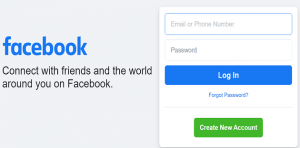
Begin the process by logging in to the Home Page of Facebook with your account details.
Step 2>> Live video
Now choose and select the “Live Video” button from the home page. And then click on “Start live broadcast.”
Step 3>> Choose the settings.
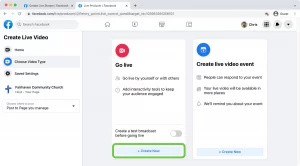
On this page, find and search the settings option where you can pick out the stream key you need.
Step 4>> Copy Stream Key
In this step, place your cursor on “Copy” and then see the Stream Key in your clipboard. And this is the procedure to get Facebook on Xbox.
How to Install and connect OBS Studio to Facebook?
Before setting up this process, ensure you know whether the OBS Studio is already installed on your Computer. After successful installation, you can update your procedure to start the program.
Step 1>> Settings
Begin the process by selecting the “File.” located at the top menu to get the “Settings”.
Step 2>> Facebook Live
Then continue the process by clicking the “Stream” option from the settings menu. At the point “Platform”, you can get a list of different platforms by selecting the drop-down menu. And finally, choose and select Facebook Live.
Step 3>> Paste the copied stream key.
Now paste the copied Facebook Stream Key and hit on “Apply>Okay”.
Step 4>> Finish the process.
Finally, the menu will be closed automatically by this; you can confirm you are done with the setup. And this is the procedure to get Facebook on Xbox.
Also learn – Ultimate Guide to Install Kodi on xbox 360
The End
To conclude, In the short term, it can be said that to play Live Gameplay, you also need a high-speed internet connection having more than 7Mb per second to get the best streaming clarity. Therefore, the above article will explain how to Stream Facebook on Xbox. Add you are confusing queries to the below comment section.
Frequently Asked Questions
1. Can you stream Facebook on Xbox Series?
Unfortunately, no, as it can only stream directly to twitch with the respective app on the Microsoft consoles, but still, the connection to Facebook remains so far and taken as a wishful think. When Microsoft makes a streaming platform, Mixer with Facebook, the connection can be made directly through the console without any problem.
2. Can you stream Facebook Gaming App on Xbox?
No! You cant stream Facebook Gaming Application on Xbox as it is available on Xbox. The only way to make use of Xbox is Twitch.