

Are you the one who surfing to know How to delete an eHarmony account? Then this guide will lead you to get the best answer. Here we let you know what is the eHarmony and its feature. Also its benefits, and how to delete the account using the site. If you want to get more information regarding this article read it until the end.
Table of Contents
What is eHarmony?

eHarmony is the online first dating site and App on the web, founded in 2000, and it is also a traditional dating app on Google play. However, it is a famous dating site on the web which have been using more than 4.1 million visitors per month. This App will be available in the United States, United Kingdom, Australia, and Canada.
It is based in Los Angeles, California, and the proprietor of this site is Nucom e-commerce. It is a german mass media company with a joint venture with ProSiebenSat 1 Media and a United States private equity firm of General Atlantic. eHarmony is the top dating website or App in some countries.
How to Delete the eHarmony account?
If the purpose of the eHarmony does not work for you, then you can delete your account permanently. Once you delete your eHarmony account all the contacts and other data will be deleted too. Here are the simple procedures to delete an eHarmony account from your web browser.
- Head into the official website of eHarmony https://www.eharmony.com and sign in with your harmony account credentials.

- Further, tap on your Profile located on the upper-right edge of the screen.
- Afterthat, choose the Data and Settings options from the list of menus.
- Now tap on the To Delete your Profile permanently on the profile visibility.
- Then press the Here option.
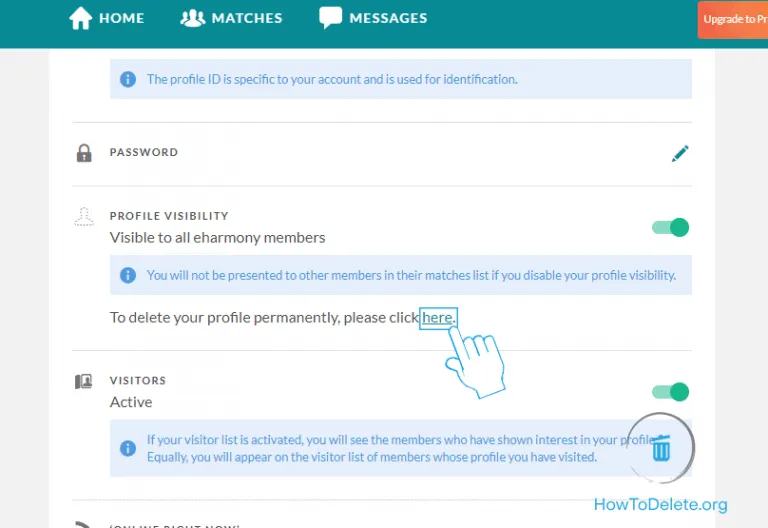
- Now register your password and then tap Delete Profile for the confirmation of your account deletion process.
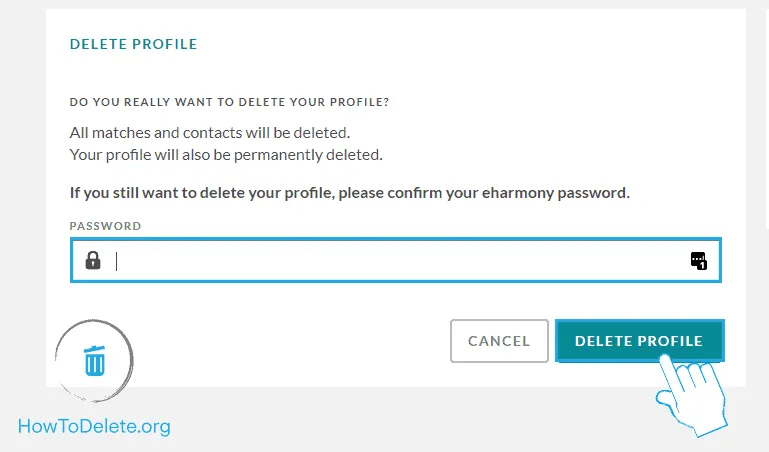
Finally, you have deleted your eHarmony account successfully. You may also like to learn about How to Delete iFunny Account?
How to cancel an eHarmony subscription?
If you have a premium membership subscription, you need to cancel your subscription after that you can delete your eharmony account from the web. Let’s see what the procedures to do are.
Via Web browser:
- Hover into the eharmony website and sign in with your account using credentials.
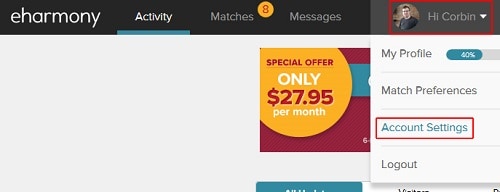
- Further, tap on the Profile picture from the right corner of your screen.
- Now pick your Account Settings on the menu list.
- Now hit the Billing icon and then pull down the page.
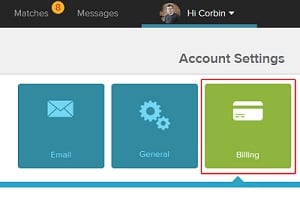
- You will see a Subscription Status from the window.
- It would help to tap on the Cancel My Subscription option below your screen.
- Now it will be canceled your subscription after a few processes.
- That’s it. You have canceled your subscription.
Via iTunes:
If you are paid via iTunes from your mobile device, you will need to follow the below-given steps to deactivate your eHarmony account.
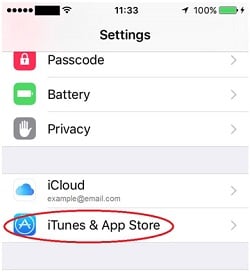
- Head into the iOS device and click Settings.
- Further, click on the iTunes and App store section under the settings.
- Now click on the Apple Id and choose View Apple ID on the pop-up.
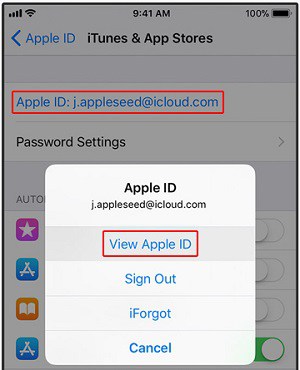
- Now you need to register your Apple ID account credentials.
- Afterthat, click on Subscriptions or Manage Subscriptions. Then you need to click on the eHarmony.
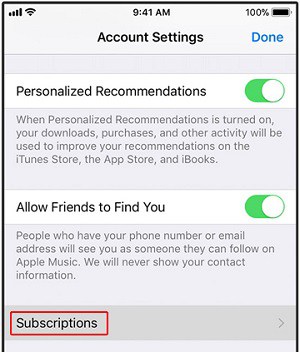
- Now click on the Cancel Subscription and confirm it by clicking.
Finally, you have canceled your eHarmony account subscription. You may also like to learn about How to Delete Badoo Account?
Pros and Cons of the eHarmony:
Pros of eHarmony:
- You can select high-standard singles from the list.
- It is a clean and easy to use its interface.
- They offer high-tech matching systems and have an extreme success rate.
- Moreover, 2 million people found love on this site.
- There are 51% of males and 49% of females are equally balanced to find their love or partner.
- eharmony App is united with a new video dating service.
Cons of eHarmony:
- They provide a limited free trial, but it will let you regularly communicate at weekends for free.
- It is a bit expensive to choose when compared with other dating sites.
- If you select casual dating, there is not ideal for singles.
- Here are too long sign-up processes to create an account compared to other dating apps.
What will happen if you deactivate your eHarmony account?
- It will remove all your contacts and matches when you deactivate your account.
- They will close your Profile permanently.
Note: If you have a Harmony membership subscription, you need to contact customer care support to delete your account.
What are the features of eHarmony?
Without any subscription:
- You can find millions of singles aiming to have a relationship.
- Choose from limitless matches.
- You can utilize all types of emojis and stickers from this App.
- With limited messaging
With Subscriptions:
- You can pick millions of singles ready to have a relationship.
- Limitless matches.
- As above said, use all emojis, smileys, or stickers from the App.
- Utilize the Video Date feature with premium.
- They offer limitless messaging options with your subscription.
- Can view unlimited photos.
- You can see who has visited you.
- Can utilize the distance search.
- You will get a detailed personal profile.
Subscription plans for eHarmony:
It has two various members that come along with your choice. You can pick any plan with the great benefits of finding your partner from this site.
- eHarmony Basic Membership– It is a free membership with unlimited matches. Although, you can send and receive smileys emojis as well as greetings. Also, you can reply to a first message, search, and view recent visitors to your Profile.
- eHarmony Premium Membership– If you have already tried a basic membership, then step on to premium membership with additional benefits. If you upgrade your service, you will get so many features that are mentioned above.
To Conclude:
We will let you know how to delete the eHarmony account on the website and iTunes from this article. eHarmony is an official dating online app founded in early 2000, and it is the most popular dating site or app in many countries. Deleting your account will make you permanently disabled. So though before you deactivate your account.
Thank you for reading this article. In case you have any inquiries or doubts regarding this article, mention them in the comment section. We will respond to you as soon as possible.