

SkyShowtime brings all of your favorites from Universal Pictures, Dreamworks, Sky, Showtime, Peacock, Nickelodeon, Paramount, and Paramount Plus to one place. This new streaming service comes with a monthly, along with 7-day free trial, and annual subscription plans. You can access this service through its supported devices like Smartphones, Tablets, PC (web browsers), Smart TVs (Apple TV, Android TV, Samsung TV, and LG TV), and Streaming devices (Chromecast with Google TV). But many have been looking for a way to get SkyShowtime on Xbox consoles. You can find the perfect way to watch SkyShowtime on your Xbox form here.
Table of Contents
Can I Watch SkyShowtime on Xbox?
No, You Cannot watch SkyShowtime on Xbox. Because, when you look for SkyShowtime on Xbox’s official Microsoft Store, there will be no application related to it. So, it is assumable that SkyShowtime is not compatible with Xbox One, Xbox Series X/S, game consoles.
How to Watch SkyShowtime on Xbox?
If you still wanna watch SkyShowtime on our Xbox, then the only possibility is by screencasting or screen mirroring. But you can do it directly with your Smart TV that is connected to a WiFi network. If you are using all of your streaming apps and services through Xbox on a Smart TV without access to WiFi, then I would recommend this method.
All you have to do is get SkyShowtime on its supported devices like Smartphones, tablets, or PC (web browsers) and cast it to your Xbox screen. If you are thinking of using a web browser to access SkyShowtime on Xbox, It is better to drop that idea. Because Microsoft Edge is the only web browser available on Xbox and it is damn slow to use it for streaming.
Do you wanna know how to watch Sky Go on Xbox? Find the best methods to watch Sky Go on Xbox from How to Wwatch NFL Game Pass on Xbox
Can I Watch SkyShowtime from Anywhere?
No, you can watch SkyShowtime only in regions that have access to it. There are 22 European regions from where you can watch SkyShowtime programs and access its features, which are,
Albania | Andorra | Bosnia and Herzegovina | Bulgaria | Croatia | Czech Republic | Denmark | Finland | Hungary | Kosovo | Montenegro | Netherlands | North Macedonia | Norway | Poland | Portugal | Romania | Serbia | Slovakia | Slovenia | Spain | Sweden
If you are not physically located in any of these regions, it is better to use a VPN service to access SkyShowtime on your device.
How to Cast SkyShowtime on Xbox?
- Get SkyShowtime on its supported devices, which can be cast to your Xbox game console.
- Connect that device and your console wirelessly through your home WiFi network.
- Cast your device’s screen to your Xbox console.
- Play content on SkyShowtime on its supported device and watch it on your Xbox.
That will be the basic procedure to get SkyShowtime on Xbox. But, you will need a SkyShowtime account and subscription to access its contents.
Subscribe to SkyShowtime
- Go to skyshowtime.com on your preferred device’s web browser.
- Select the Join SkyShowtime option at the top right-hand side.
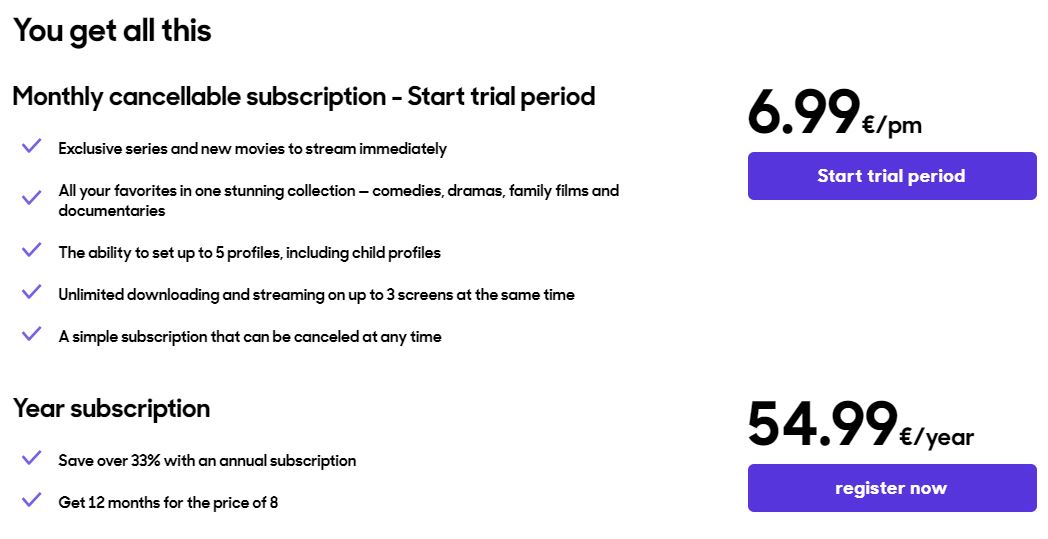
- Choose either the monthly or yearly plan and select Start Trial Period or Register Now option.
- Provide your Email Address and password for your SkyShowtime account and select the Start Subscription option.
- Complete the payment process and get access to SkyShowtime shows.
Screencast Smartphone / Tablet to Xbox
NOTE: Make sure that Smartphone or Tablet is connected to Xbox through the same WiFi network.
- You can get the SkyShowtime app on your iOS and Android devices from their default app stores.
- After installation, you can use your subscription account credentials to sign in.
- Start to play your favorite content from SkyShowtime.
- On the video player select the Cast icon.

- Select your Xbox Game Console from available devices.
The SkyShowtime content is cast to your Xbox device-connected TV screen.
Check the Post: How to Install and access the Sky Go on Xbox
How to Cast on Xbox?
PC users can directly access SkyShowtime from its official website. If you are using the Google Chrome browser on your PC, you can cast its web page directly to any device. to access the SkyShowtime site on your Xbox, your PC, and Game Console are to be on the same WiFi network. The procedure to cast SkyShowtime from PC is as follows,
- Visit the skyshowtime.com site on your PC on the Google Chrome web browser.
- Now Sign In to your SkyShowtime account with your credentials.
- Tap on the three vertical dots icon to open the Google Chrome browser menu.
- Select Cast and wait till our Xbox Game console is discovered.
- Choose your Xbox and get your browser screencast to its connected TV screen.

With the following methods, you can now easily watch SkyShowtime TV Shows, Movies, and more on your Xbox.
Additional Info, How to Watch Fox Sports on Xbox
Does SkyShowtime Offer a Free Trial?

Yes, you can get a 7-Day free trial by subscribing to its monthly subscription plan. This plan is available only for first-time subscribers. Once the trial period ends the monthly billing of SkyShowtime starts. The subscription will be automatically billed every month until the automatic payment option is disabled.
Suggestions
In recent times, there is no Smart TV that does not come with internet support. So, I would recommend you directly cast SkyShowtime on your Smart TV instead of using Xbox. Because Xbox can be not discovered on available devices search while screencasting. Try using Chromecast with Google TV to directly access the SkyShowtime app on your big screen.