
Are you having a Firestick device? then you can watch free movies and TV series. if you are curious about how to stream? read our article completely till the end to know How to watch Rakuten TV Firestick? You can get all the latest movies and TV shows as well as many programs free of cost and also can subscribe to it to explore all movies.

Table of Contents
What is Rakuten TV?
Rakuten TV is an on-demand video streaming service
This TV service video content offers stream on most devices that provide a similar service to Netflix and any other streaming services. Rakuten TV’s headquarter is situated in Barcelona and operates now in twelve countries in Europe, the United Kingdom, Germany, Spain, France, Italy, Australia, Ireland, Belgium, Portugal, Luxembourg, and Switzerland Netherland.
What are the Features of Rakuten TV?
- It allows you to watch desired TV shows and movies.
- Premium content is included in the Rakuten TV app. You can choose Rakuten TV for free.
- Subscribers can utilise it for free service.
- You can watch Rakuten TV free for your smart TV without signing up.
- It is compatible with 4K Ultra HD video content.
- To watch movies, Rakuten Boasts will be a great option.
- Also, you can watch Holywood movies such as Batman vs Superman, The Conjuring, and many more.
- Choose your genres, including Action, Romance, comedy, horror, etc.
- This service is available on Android and iOS smartphones as well as all Apple devices.
- Stream Rakuten TV using streaming devices such as Amazon firestick or Fire TV, or Google Chromecast.
How to Stream Rakuten TV on Firestick?
Rakuten TV doesn’t have an app to download on the Firestick device. So you should opt for sideloading method to stream Rakuten TV on Firestick by using the Downloader app and ES File Explorer.
Steps to Watch Rakuten TV on Firestick via Downloader app
Pre-Requisites:
👉Step 1
Hover to the Firestick Home screen and navigate to the settings.
👉Step 2
Choose My Fire TV on your settings.
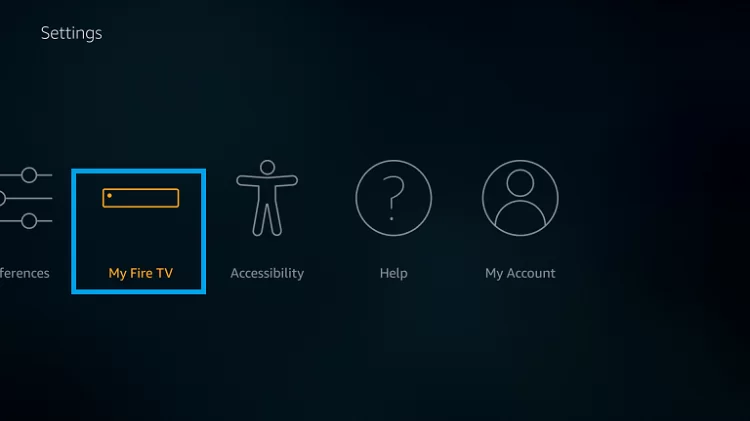
👉Step 3
Click on the Developer Options and then tap Apps from Unknown Sources.
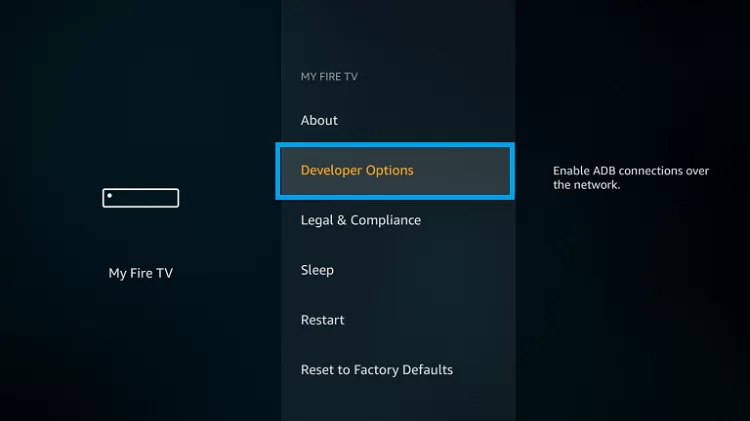
👉Step 4
At last, opt to enable the Apps from Unknown Sources under the developer option.
To watch Rakuten TV on your Firestick via Downloader App:
👉Step 1
Navigate to the Firestick Home screen and then visit the Apps to get the Downloader app.
👉Step 2
Click to download the Downloader app on your Firestick.

👉Step 3
Further, launch them to your device’s Home screen then opt for the Home tab on the left side of your screen.
👉Step 4
Navigate to the URL and go to the URL on the respective field.

👉Step 5
Hit the Go on your device, and install the downloader app.
👉Step 6
Launch the install app on your screen and then open it on your Firestick device.
👉Step 7
Finally, log in to the Rakuten TV account credentials, and stream your favourite Rakuten TV content on your Smart TV linked to the Firestick device.
To stream Rakuten TV on your Firestick via ES File Explorer:
Install the Rakuten TV on your Amazon Firestick device through ES File Explorer. Follow the given steps to get the app on your Firestick device immediately.
👉Step 1
Bind up your Firestick to the standard internet source.
👉Step 2
Launch the Downloader app and head towards the URL on your ES File Explorer APK.
👉Step 3
Select to download the app, then click to open option to get ES File Explorer and hit the Done bar after it completes.
👉Step 4
It will ask to delete the APK, so opt for the Delete option and make sure to delete the APK.
👉Step 5
Head to the menu option, select the Tools and move to the Download Manager.
👉Step 6
Now pick the + New icon on your screen.

👉Step 7
Pick the path and field option and register the Rakuten TV apk.
👉Step 8
Choose the Next tab then register your Name, and then click the Next option.
👉Step 9
Now, proceed to the download now option and it will begin to download the apk file.
👉Step 10
It would help if you launched it to the Rakuten TV directly or otherwise, click the done option.
👉Step 11
At last, you can watch Rakuten TV video content on your Firestick via ES File Explorer APK on your Firestick.
To Conclude:
Rakuten TV is a VOD Video On-demand platform to watch with its subscription and purchase or rent its Movies and TV shows. You can watch Rakuten TV on Firestick via sideloading methods. Because it doesn’t build with the app, you can alternatively download it as an Apk from the downloader app and ES File Explorer. If you have any issues or queries regarding streaming Rakuten TV on Firestick, let me know in the comment section.
FAQs:
1. Can I watch Rakuten TV on Firestick?
Yes, you can watch Rakuten TV on your Firestick using the sideloading method. There is no direct method to download the Rakuten TV app on a Firestick device.
2. Can I watch Rakuten TV for free?
Of course, you can watch Rakuten TV for free of cost without creating an account.
3. What Rakuten TV supports devices?
Rakuten TV is compatible with Android iOS devices, Samsung smart TV, Hisense TV, Philips TV, Panasonic smart TV, Vestel smart TV from 2020, and LG smart TV.