
Netflix is the most popular Streaming service and it has many shows, Movies, and More entertainment content. It streams the latest Movies and Shows from worldwide and it is easy to use on your Firestick device. According to your Subscription plans the number of Streams gets different. Once you finish your movies on your Netflix then you sign out of the account to free up space. But don’t know the way to Log out your account on the Netflix service on Firestick. We will help you How to Log Out of Netflix on Firestick.
Scroll Down to know more related Informations.
Table of Contents
How to Log Out of Netflix on Firestick?
If you are using Netflix streaming services to Watch all your favorite amazing latest movies. Once you subscribe to Netflix there are six users can access the single account to watch its separate favorite content. The user’s Access can vary based on your Plans. If you subscribed to the cheaper plans. Sometimes a few users can access the device at the same time. More than two devices concurrently do not work on the Basic plans.
Suppose, you are the admin for the account then you may need to Log out to the user’s Account. According to the account users, you can log out yourself and give a Free space for the Other user to access their account on Netflix.
The steps are:

- From the Home page of the Firestick device move to the setting option.

- Then choose the application option and click Manage all installed applications.
- Tap the Netflix application from the app list.
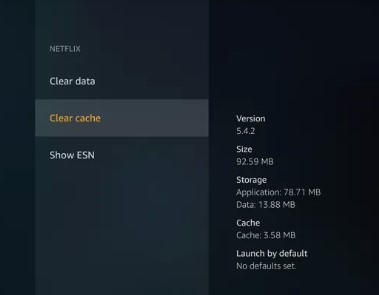
- Hit the Clear data option.
Once you have done the Process you can successfully sign out of the Netflix account on the Firestick device.
Also, Read How to Get Netflix Party on Firestick
Steps to Log out of Netflix on Firestick: [Using Webiste].
If You don’t use the Netflix Account so longer then you can sign out of the account from all devices remotely using the Netflix Website. This is one of the ways to Log out of the account by using its website.
The Steps are:
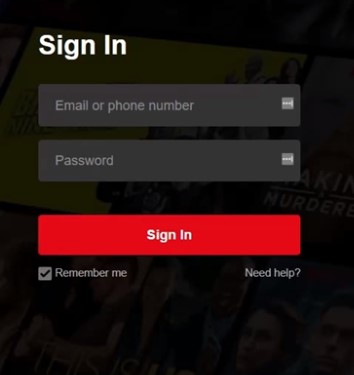
- Sign into your Netflix account by using a Web browser.
- Choose the Picture icon and which is located at the top right part of the screen then you can select the Account option.
- In the account setting page, Swipe down to settings and choose the sign out all the devices option.
Once it’s done, then you can’t be able to access the Netflix service without re-logging into the account.
Logging Out from All the Devices:
If you are not using your Netflix Streaming service for Log time. Then you can Loggin out from all the devices. You didn’t use a Firestick remote for doing this Process. Only you should need a Web browser. And follow our upcoming commands.
The Steps are:
- Navigate to the Official site of Netflix.com and Move to the Upper-right corner.
- Click your Profile icon and Tap your account.
- Swipe down and move to the setting option and search for the sign out of all devices option.
- Once you get the option to confirm tap the option of sign out.
Once you did the process the Netflix service gets logged out from all the devices.
Additional Info, How to Log Out of Netflix on TV
Clear Caches on Netflix:
If you have any issues with your Netflix Service then you have decided to delete the application or Log out of the account from Netflix. Instead of that, you can try to clear the Caches on your Netffilx to get a Flow of content. Once you clear the Netflix data and Free up the storage space. Then you can watch all your Favorites.
The steps are:
- From the Home page of your device Move to the Setting option.

- Click the gear icon.
- Swipe Down till you get the Option of “Application Manager” or Apps from the List.
- Bring up a list of every application that is currently installed on your device. Then you click the Netflix application.
- Click the Clear Cache application and Click to delete all the unwanted data from your Netflix to free up the space for your application to Stream the content without any buffer.
Check the Post: How to Fix Netflix Not Working on Firestick
How to Delete the Netflix account on Firestick?
You can also delete or uninstall the application on your Firestick device. Instead of logging out of the account.
The Steps are:
- Click the setting option.

- Choose the application option.
- Press the manage All installed application option.
- Choose the Netflix account.
- And then finally click the delete or Uninstalled option.
Closing Off
Now you Got a Way to Log out of the Netflix account on your Firestick device. We have mentioned the steps and Methods for you. You can use these methods to Log out the account. Additionally, we have included the steps for deleting and Clearing the data for your Netflix. We hope you like this article. Refer to this Guide, If you have any doubts or need any additional information, let me know in this comment section.
Frequently Asked Questions:
1) How to Log out an account on Netflix?
- Launch a browser and Move to Netflix. com.
- Click your Profile icon.
- Press the account.
- Then tap the Sign Out of All devices.
- Atlast click the Sign Out option.
2) Can I have Two Accounts on one Firestick device?
App subscriptions, Content gets, and Rentals on your device account are shared with another profile on your devices. Moreover, you can have a total of Six profiles on your Fire TV.
3) How Can I Register my Firestick to the various account?
- From the main Page of the Firestick, click the setting option.
- Navigate to the My Account section.
- Now, you have to register to another account, Choose the Amazon account from the display then choose the Deregister.
- If you de-register then you can re-register your Fire TV with any account Then you choose by selecting the register option.