
![How to Get Golf TV on Firestick? [PGA Tour|Golf TV Pass]](https://techthanos.com/wp-content/uploads/2023/03/How-to-Get-Golf-TV-on-Firestick-PGA-TourGolf-TV-Pass.jpg)
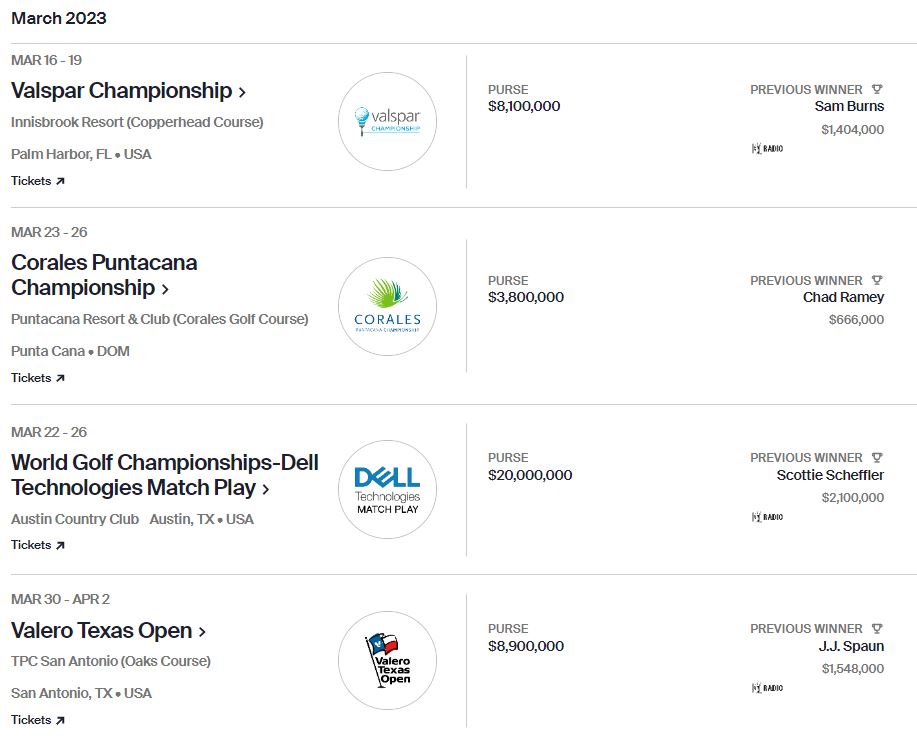
Golf TV has been providing Golf Content to every Golf Fan in this world. With Golf TV you can now watch PGA Tour live on all of its supported devices. But can you get Golf TV on FireStick? Many FireStick users with a love for golf have been asking about it. If you are one amount them, this article will give you different methods that can be used to access Golf TV on FireStick. The next PGA Tour live you can watch on FireStick using Golf TV Pass will be on 16th-19th March 2023.
Table of Contents
Is Golf TV on FireStick?
No, the official app of Golf TV is not available for FireStick devices. The Golf TV app is available only for Android and iOS devices. So, you cannot directly get Golf TV on FireStick but can use alternative methods and watch PGA Tour live on FireStick.
Golf TV:

Golf TV offers international streaming of the PGA Tour except in the United States, US Territories, China, Cubs, and North, and South Korea. Eventhough it is owned by Warner Bros. Discovery, due to the deal with the PGA Tour, media rights for 12 years to stream outside of the US are established.
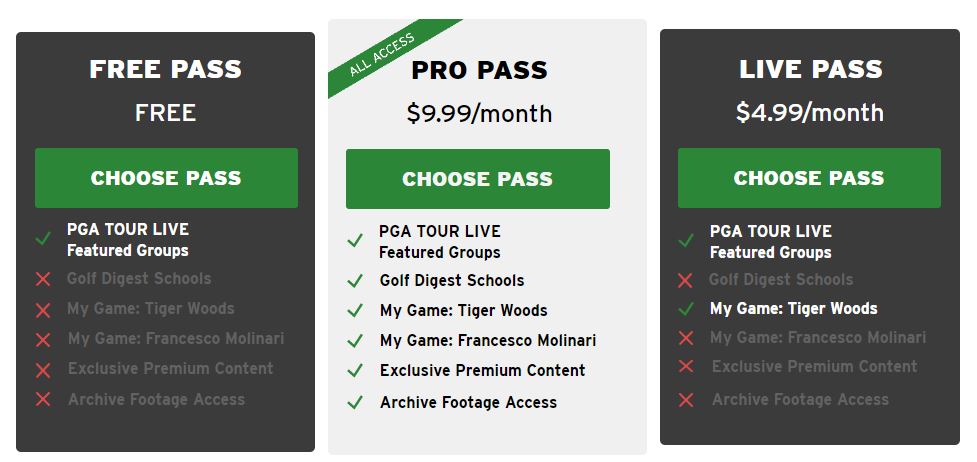
Golf TV has developed its own streaming service app, where live events can be accessed through Golf TV Pass. You can watch PGA TOUR LIVE Featured Groups, Golf Digest Schools, My Game: Tiger Woods, My Game: Francesco Molinari, and more exclusive premium content and access to archive footage.
Is VPN Needed to Watch Golf TV on FireStick in The US?
Yes, Since Golf TV has no rights to stream its content in the US, you must change your IP address to an accessible location using a VPN. The best location to use VPN to access the Golf TV app on FireStick would be the UK.
How to Get Golf TV on FireStick?

With the help of the Apps2Fire app, you can sideload the Golf TV app from your Android device to your FireStick device. You can screen mirror the Golf TV app from your iOS device to a FireStick device-connected TV screen. To access the content offered by Golf TV, you need to create an account and subscribe to any of the Golf TV Pass.
How to Create an Account and Subscribe to Golf TV?
Without a Golf TV account, it is impossible to access its contents. Once you create an account on Golf TV, you can get access to PGA Tour Live Featured Groups on the Group TV app. But to access more of its content you need to subscribe to Live Pass or the Pro Pass plan. The Simple step to get your own Gofl TV account and Golf TV Pass of your choice are as follows,
Create a Golf TV Account:
- Visit the Golf TV official site on a web browser on a Smartphone, tablet, or PC.
- Tap on Register and provide the information asked.
- Agree to the terms and conditions and press the Create Account option.
Subscribe to Golf TV Pass:
- Now go to welcome.golf.tv site on a web browser on a Smartphone, tablet, or PC.
- Now tap on the Get 7 Days Free option and Choose a Pass of your choice.
- Provide your Golf TV account credentials and Sing In.
- Complete the payment process for the Golf TV pass using your credit card details or other payment gateways.
NOTE: The payment for Golf TV Pass renews automatically every month. Make sure to turn off automatic payment to save your money from disappearing without your knowledge.
With Golf TV credentials and Golf TV Pass, you can easily watch PGA Tour live on your device. If you have Pro Pass, you can access every program available on Golf TV. You may also like to learn about How to Watch XFL on Firestick?
How to Watch Golf TV on FireStick?
The simplest way to watch Golf TV content on your FireStick would be by screencasting or screen mirroring. The Golf TV app from your Smartphone can be cast or mirrored to your FireStick device-connected TV screen. Here is the simple procedure to watch Golf TV content on your Fire TV.
NOTE: Connect your Smartphone and FireStick device to the same WiFi network to do a Screencast or Screen Mirror.
- Download and Install the Golf TV app on your Smartphone from the default app stores.
- After installation launch the app.
- Use your Golf TV Pass credentials and Sign In to your account.
- Select the content you want to watch.
- Now go to Notification Tab or open the Command Center on your Smartphone.
- Tap on Screen Cast, Smart View, or Screen Mirroring option.
- Wait for your FireStick device to show and tap on your FireStick device name.
- Your Smartphone screen with Golf TV is now cast or mirrored to the FireStick device screen.
How to Get Golf TV App on FireStick? [Apps2Fire]
Other than the Screencast of Screen mirroring, you can use the Apps2Fire app and get any app from your Android device to your FireStick. With this method, you can easily get the Golf TV app sideloaded to your FireStick device. Here are the simple procedures to access Golf TV content directly on your FireStick.

- Press the Home button on FireStick remote, go to My Fire TV options, and select About.
- Highlight the name of your FireStick and press the OK button 7 times to become a developer.
- Go back and select the developer option and turn on USB debugging and Apps from the Unknown Sources option.

- Under the About menu on FireStick tap on Network to get your FireStick device IP address.
- Get the Apps2Fire and Golf TV apps on your Android device.
- Now launch the Apps2Fire app and tap on the vertical three dots to open the Menu.
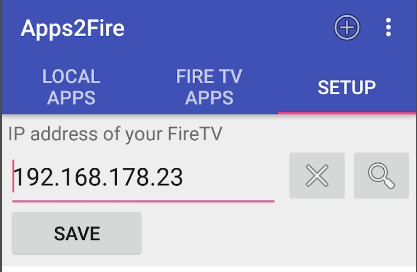
- Select the Setup option and enter your FireStick device IP address and tap on Save.
- Go to the Apps2Fire home page and select Local Apps.
- Find the Golf TV app and tap on Install.
- Wait for the sideloading process to complete and get the installation complete pop-up on FireStick.
You a now access the Golf TV app on yoru FireStick device and watch the PGA tour live on your TV.
NOTE: It is not yet evident that weather the Golf TV app will work with the FireStick device or not. If it is not working, then you need to try other alternative streaming apps on FrieStick to watch PGA Tour live.
You may also like to learn about Dream TV on FireStick
Alternate Ways to Watch Golf on FireStick:
If you are keen to watch PGA Tour live on FireStick, you can use apps that are compatible with FrieStick. With this app, you can access those that have broadcast rights over PGA Tour. The channel that has a live broadcast right of the PGA Tour is NBC which is till 2030. The streaming service apps that can be used on FireStick to watch Golf are,
- YouTube TV
- ESPN+
- Hulu+Live TV
- Sling TV
- Fubo TV
You may also like to learn about What Channel is LIV Golf on Xfinity?
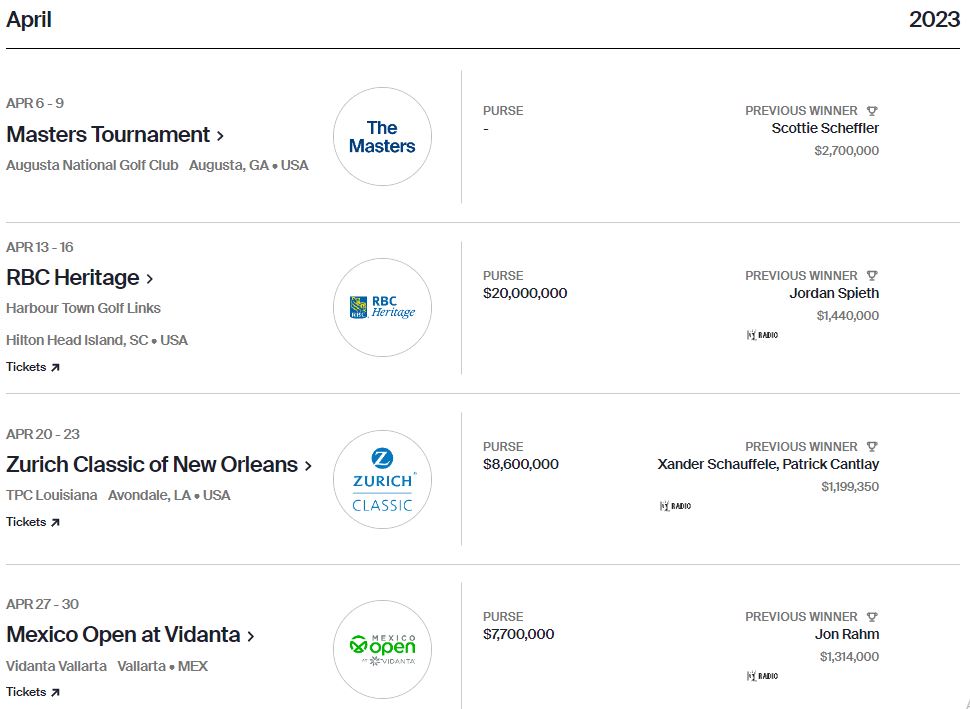
PGA Tour Schedule:
THE END
You can now watch PGA Tour Live on FireStick using the Golf TV app. Since NBC channel is the broadcast rights holder, you can get a streaming service app with NBC in its channel lineup on FireStick and watch PGA Tour. If you have a Golf TV app make sure to use VPN and Golf TV Pass to access exclusive Golf content on your FireStick.
Frequently Asked Questions:
Is Golf TV Free?
Yes, you can get the Golf TV app for free and you can get a 7-day free trial on your subscription. Without a subscription, you can use the Free Pass to watch PGA Tour Live.
Which is the best app to watch PGA Tour on FireStick?
Peacock TV is the best app to watch PGA Tour in 2023. You can watch it using the Peacock TV Premium subscription on your FireStick.