
![How to Install Gears TV on FireStickFire TV [SideLoad]](https://techthanos.com/wp-content/uploads/2022/05/How-to-Install-Gears-TV-on-FireStickFire-TV-SideLoad.jpg)
Gears TV is one of the best IPTV services that have a wide range of streaming options. You can watch all your favorite programs, Live TV, on-demand content, and PPV events on Gears TV IPTV. You can watch up to 500 worldwide channels using this app. The Gears TV app can be used to cut cables at your home and use WiFi to access all your favorite channels. If you have a FireStick device and want to watch Gears TV on it, then you can refer to this article on How to Install Gears TV on FireStick / Fire TV to install Gears TV on your device.
Table of Contents
Is Gears TV on Fire Stick:

Yes, the Gears TV app is compatible with FireStick, but it is not available on Amazon App Store. The only way to get Gears TV on your FireStick device is by sideloading the app using applications like Downloader, ES File Explorer, etc. You must have a secure URL for Gears TV APK file to download and install the app on yoru device.
Gears TV:
IPTV apps are used to stream online videos. Among many IPTV apps Gears TV marks a great impression on people. It gives access to many TV channels and many countries. By using Gears TV we can entertain ourselves with movies and TV shows.
A GEAR TV is available on Android and Firestick devices. You can enjoy your favorite television shows and movies on Gears TV. By subscribing Gears TV app you can enjoy premium channels. Gears TV has more than 300 channels, which you can stream online anywhere.
Gears TV’s Features:
- Your favorite channels and shows can be streamed anywhere and anytime without the cable connection on Gears TV.
- Gears TV has a large library of channels and you can stream your video without buffering.
- Gears TV has unlimited bandwidth, so you can watch your video without any loading.
- There is no need for any extra charges to watch special shows or sports.
You may also like to learn about How to Install Sportz TV IPTV on FireStick?
How to Install Gears TV on Firestick?[Downloader]
The Gears TV application is not available in the play store or Amazon store. So you have to download the app from Firestick.
- Go to Settings on the Firestick home.

- Click on the Fire TV and select the Developer option.

- From Unknown Sources Enable the ADB debugging and apps.

- Now on the Firestick, go to the home screen and tap on the search option.,

- Now search the Gears TV app by typing the name on the search bar.

- Select the right one from the search results and start downloading.
- After downloading install the package.
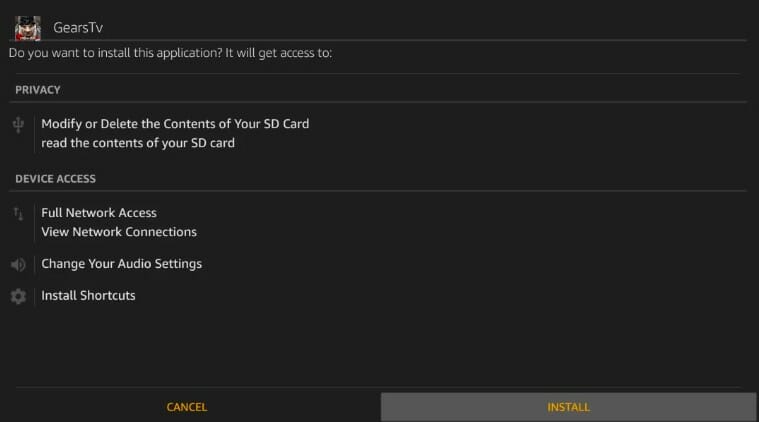
- Now open the Gears TV app and accept the privacy policies.
- Now you can enjoy your TV channels and shows on the Firestick Gears TV player.
You may also like to learn about How to Install Beast TV IPTV on FireStick?
Final words:
Gears TV gives us a large list of channels. It entertains us in a great manner. Using Gears TV in Firestick takes the experience to the next level. We hope this article helped you to get the information you surfed for.
Frequently Asked Questions:
Does Gears TV have a free trial?
Yes, we offer free GEARS Tv as free trial testing and includes Gears TV Now offers A1 TV, Desert Stream, Gears TV with/without the Mayfair Pro Guide, Gears Reloaded, Scorpion Streams, and StreamTime TV Max for your streaming enjoyment. 4b.
How to cancel the Gears Tv subscription?
We strive to ensure that all of our customers are satisfied. We hope you stay with us, but we understand that our service may not be for everyone. If for any reason you no longer want to use the Gears TV Now service, just don’t renew the service next month as there are no contracts. your account will be automatically disabled if you participate in our monthly renewal plans. If you participate in automatic payment plans, canceling the service via email, chat, or phone at 888-778-5358 is also simple and you will no longer be charged for the service.