
If you are an Anime lover then this guide will help you to stream all the anime content for free on your Firestick. Without any delay, let’s get into this guide to know the various possible ways to install Fire Anime on Firestick. Read continuously to get all the information related to Free Anime on Firestick.
Fire Anime is a streaming service that allows watching various anime content. However, it is an Android app so if you want to watch its content on the big screen. Then you should screen mirror or jailbreak your device in order to watch Fire Anime on your screen. It is a dedicated app for anime watchers and it includes unlimited anime series to stream.
Above all, it is an unofficial streaming platform that offers to stream free without any subscription required. Besides, it doesn’t host any content and also you can get updates regularly with anime and its episodes. If you want to get Fire Anime on Firestick, then read the below session.
Also, Read best apps for firestick
Table of Contents
How to Get Fire Anime on Firestick?

Regrettably, the Fire Anime app is not available on your Firestick. So you can sideload it using any third-party apps such as Downloader, ES File Explorer, and so on. So let’s get into procedures to install the downloader app on your Firestick in order to get Fire Anime on your device.
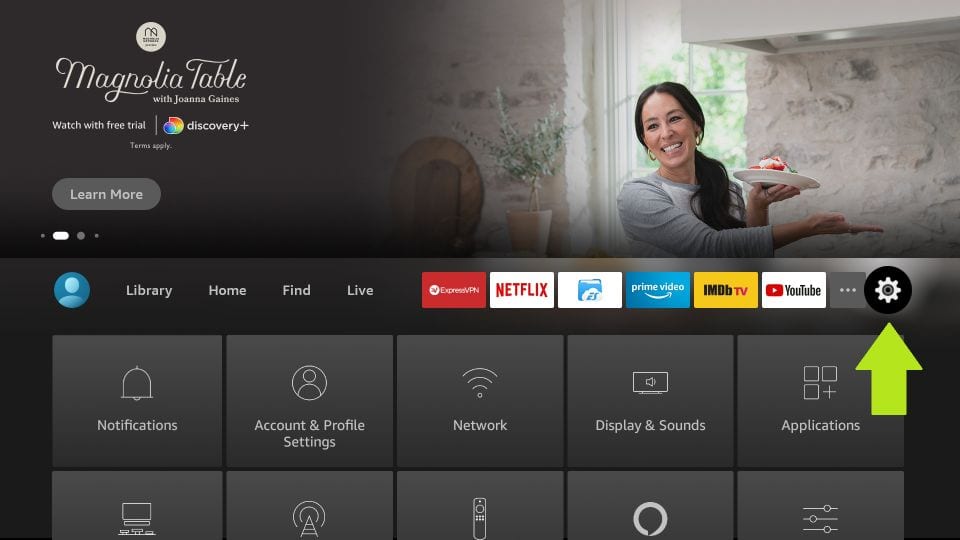
Turn on Unknown Sources from Firestick:
- Avail on the Home page of your Firestick.

- Tap on the Settings option.
- Choose My Fire TV.
- Tap on the Developer Options.
- Pick the Apps from Unknown Sources.
- Tap the Turn On tab.



Install Downloader on Firestick:
The Downloader app is available on your Amazon App Store officially, so you can get it straightforwardly from the below steps.
- Head to Firestick’s Main menu.
- Tap on the Find menu.
- Choose the Search option.
- Look for the Downloader app.
- Tap the download icon.
- Launch it and then head to the Home.
- Further, paste Fire Anime’s official site.
- Tap the Go tab to download.
- Click the Install tab.
- Again, tap on the Open tab.
- After that, click on the Delete tab.

Now you can explore all the anime content on your Fire TV screen.
Related guide: install apps on firestick
How to Access Fire Anime on Firestick?
To use the Fire Anime app on your Fire TV, you should change the app’s location to your main page. Now open it and then follow the given below instructions to watch Fire Anime content on your Fire TV screen.
- Once launched the Fire Anime app, choose the app settings.
- Now choose the trailer from the Anime Series.
- Further, select the Add ons.
- If there is No log Policy.
- Pick the Real Debrid.
- To get fast streaming, you should load the balance.
- Using the search bar, you can get a variety of content like genres, and seasons.
- Also, it is categorized by season, date, release, type, and so on.
- Now you can choose any of the content and then stream on the big screen.
Does Fire Anime Safe?
Fire Anime is a third-party app that is officially not available on your Fire TV’s app store. So it is not able to determine that this app is entirely free to stream. You should make sure of the app’s content by proceeding with independent verification while you install it. Suppose you want to stream its content in any way then use any reliable VPN in order to watch its content safely and securely without any troubles.
Check out this post: install new apps on Firestick
How to Stream Fire Anime anonymously?
- First of all, you should purchase a reliable VPN service.
- Get into the Find menu then choose the Search option.
- Browse for the VPN app that you have subscribed to it.
- Once you get the right app on the search result.
- Tap on the Download tab to install the app.
- After it gets installed, launch it on your Fire TV.
- Proceed to the login page and then enter the valid credentials.
- Now tap the Power icon from your VPN to connect with a server.
- Set your location according to your preference.
- Finally, you can watch any of the Fire Anime content on your Firestick anonymously.
How to Fix When Fire Anime Not Working on Firestick?
If the Fire Anime content streaming on your Fire TV screen then get to know the effective fixing steps in the below session.
1. Clear Cache on your Firestick:
If you are facing any buffering or lagging issues on your screen while streaming its content. And also it takes some time to open the app when you launch it. In that case, you should make sure that you are connected with a high-speed internet connection. Suppose everything seems to be alright but your device cache file is overloading, then delete the cache files from your Fire TV.
2. Update the Fire Anime:
If you are using an outdated app then you should have to up to date with the current version. Probably this may also be one of the reasons for the not working issue on your Firestick. To update the Fire Anime app on your Fire TV, follow the below instructions.
- Launch the app and then tap the menu.
- There you will see an update if any.
- Tap on it in order to install them.
What are the best alternatives for Fire Anime?
- AstonCine
- BeeTV
- Rapid Streamz
- Typhoon TV
Wrapping Up:
To conclude this article, we have explained the possible ways to install and stream on your Firestick. Additionally, we have mentioned the solution when Fire Anime not working on your Firestick. If you have any questions or queries regarding Fire Anime on Firestick, use the comment section below.
FAQs:
1. Does Firestick includes any Anime content to stream?
If you want to stream classic or exclusive anime content then you should get to know the amazing way to stream anime content on your Fire TV. Because Firestick includes many anime apps in their app store to download and stream.
2. Can I watch Anime on Amazon Prime Video?
Fortunately, Amazon Prime Video includes many anime contents from classic to new to watch. Also, it includes many best TV shows and movies to watch through its platform.
3. Is Funimation free on Fire TV?
Luckily, you can watch Funimation content free on your TV by signing up with your compatible device. However, you can relish it by watching movies and TV shows along with ad-free service.