
Ad-blocking is an essential matter in this trendy world. But there are no system-wide adblock for Android is not available on the Google Play store. So instead of downloading the app from the app store, install it from their own website. Also, Many people don’t know which blocker is affordable to use. In this article, we will see how to AdBlock for Android. There are several ways to block the ads. This article will provide the apps in both free and paid versions. You guys can choose your favorite app Adblock for Android. Moreover, you guys can choose any method to block the unwanted content. to know the methods, just scroll the Article.

Table of Contents
What is an Adblock for Android?

An ad Blocker is a software application, that eliminates the advertisement content from the website, including the pop-up advertisement. Advertisement is digital information that happening across the world. There are several ways to get ad blocking on your Android device. This app is exclusively required for installing third-party apps. But there are the actual benefits to advertising.
Is Adblock safe?
Ad blockers are totally safe to use and in fact, the highly recommended app to install on your Android device for annoying ads. These ad blockers come bundled with a VPN to boost overall security. Also, many people think that ad-blockers take money away from independent creators. But the actual thing is ad blockers block unwanted content on your mobile. There are many of software to block the ad. So to know more deeply, just read the whole article.
Read also: Control the Ads That You See On Your Browser
Change your DNS

The cost for this is totally free. So you can change the DNS and it Can block the ads before they ever get to your phone. Simply, go to your Wi-Fi settings >> search for the DNS settings >> change it from Automatic to private DNS. There are many but the AdGuards DNS is about as good as it gets.
So for Windows 10, Go to settings >> Network >> Adapter >> tap on right-click >> properties >> IPv4 >> choose any DNS Server settings.
This method may change because it depends on the device storage and preference. Also, you can set the fastest DNS was 1.1.1.1 and 1.0.0.1So try this method to stop the ads on your phone.
The best adblock for Android
There are different types of software available on the internet and app store. We can install it directly and can use the app. So this is one of the best Adblocks for Android. Before that, we should block the extensions for safe browsing. To see block the ads on the default browser. To do that, just install the uBlock origin or adblock plus apps to block the unwanted ads on the browser. To know the apps just read the below article.
AdAway
AdAway is a free application and open source for Android users. This blocks ads using the host’s file from the various locations and joints them automatically. Moreover, this is the opensource, and this has a safety and privacy policy for the customers. This will block ads from YouTube, Facebook, Twitch, and all websites. These apps work for free, but you can donate some dollars according to your wish. The only disappointment is, that you can download this app from their website but not in the Play Store. You can set the options like when they using the internet this app will work, if they in offline this app will sleep. So, you people can access these options.
Also read: How to Turn Off Ads on Roku TV?
Adblock Plus for Android
This Adblock Plus is a free and open-source browser extension for blocking and filtering unwanted content. In addition, they provide the paid version for the users. The paid version cost is $24.99 per year. These ad blockers will block all ads on the device. This app is like the browser extension and it runs in the background. Moreover to know the steps to block the ad in Chrome just follow these steps.
To Install – Go to the website>> install the app and click on the app>> add to chrome >> click to add an option for the confirmations. Moreover, if you people have any network issues, just use a VPN for better services. This app gets the most ratings compared to other apps. More than millions of users are using Adblock Plus. Also, Adblock Plus is compatible with Android devices. So you can enjoy the Adblock Plus on your device.
AdGuard
This is one of the popular apps for blocking content. Millions of users are using this AdGuard app. Moreover, this app is available for Windows, Linux, MacOS, Android, and iOS. Also, this is available for the browser extensions. This app has one main feature which is, this app blocks video ads, interstitial ads, floating ads, banners, and text ads and soon. The Adguard app is only for the Yandex browser and Samsung Internet with customizable filters. In addition, this app is a battery saver and data, it filters all unwanted contents and ads and also it secures your privacy. So, you can use this app with tons of guarantees. If you are interested in purchasing this Adblock For Android, visit the official site. For more reference, we will attach the picture below.
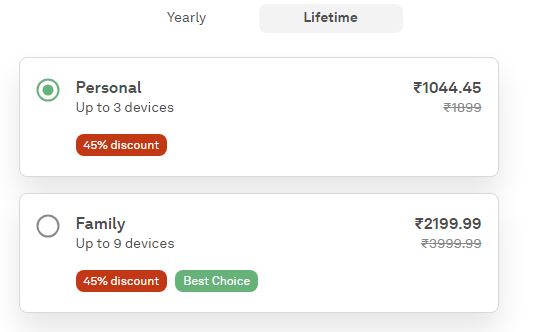
So these are the plans available for this app. Moreover, this app has many special features like Ad blocking, Privacy protection Parental control Powerful authentication, Security of the browser, and so on.
Blokada
If you guys are Android users and use this app. This is totally different from the other applications. Also, it’s available for iOS. This app is trusted and free forever. This is the king of all the apps compared to other apps.
- Browse faster by loading less data
- Increase the battery life
- DNS-based inception for all modern browsers and apps.
- Can set up an unlimited amount of devices with one subscription.
So you can use the many devices under the one subscriptions. Nearly, you can connect 5 devices under a single subscription. In addition, if you have any network connections, just connect your network to the VPN service. This is available for free for single users. Also, this app has a premium service.
Also, visit How to Adblock on Crunchyroll.
Adblock For Android – DNS66
DN66 is an open source and also available for free. The app keeps anything on the blacklist and can’t filter through to your phone. You guys can also customize your DNS Server the way you want. Some ads might make it but not because they are not blacklisted yet. This has many features as blocking the host names, blocking ads, blocking mining code blocks, viewing information about the network connections, and so on. Moreover, if you people are an Android user and can use this DNS66.
Ghostery for Android

If you guys are Firefox users, just use this app to block unwanted content. Also, this will support other browsers like Firefox, Google Chrome, Internet Explorer, Safari, and so on. In addition, this app will clear the webpages from jumble and the loading time will be less. This has AI-powered filtering to restrict unwanted content and intelligent blocking, Super privacy and protections, and so on. Also, the most surprising matter is, that this app is available for free.
App Brain
this app helps people block ads and restrict unwanted content on browsers. You can install it directly from the Play Store. The installation steps are given below, check your internet connection>> go to Play Store>> search for the APPBrain Ad detector >> select the first app >> tap on the install button >> Yeah, you are Done! Now you can sign in to this app. Moreover, this app will detect all the spam messages on your phone. So believe me this app is one of the most common apps used by many people.
AdBlock Stick
Yes, this is the safest and legal app for users. This stick is a USB and this supports Android devices. This USB has hardware, that blocks ads, viruses, and so on. Also, this boosts your network connection speed and blocks unwanted content. The only specialty of this Stick is, this does not need any space on your mobile, just needs a USB. And you can carry your USB with you. Moreover, this has some pricing plans for their customer. For more reference of this paid version, will be attached the picture below.
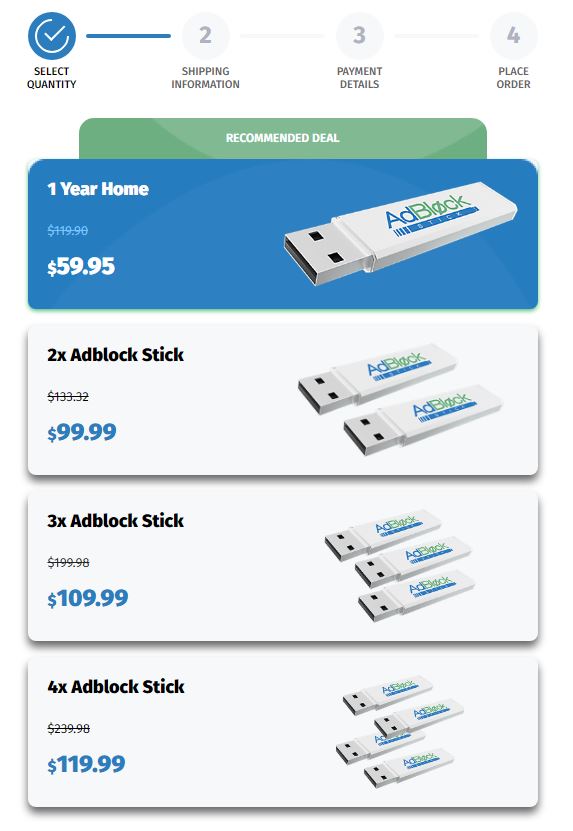
So these are the costs for the AdBlock sticks and The main features of these sticks,
- restrict the unwanted contents
- Increase the network speed.
- Supports multiple devices
- Restrict all types of ads.
Also, visit What Channel Is SEC Network On Mediacom?
Conclusion
In this article, we will see the many methods to block ads on social media. From my point of view, you can choose any app. First, try the free edition, and if you feel that the app working is well. Further, you just go to the paid version. If you guys have any doubts related to this article, just comment in the comment box. Let’s share ideas and mistakes together and grow together!