
Acron TV is the best entertaining Streaming service and it has various collections of Movies and shows. Additionally, it has a variety of categories of entertainment programs such as Comedy, Romance, Horror, Drama, Classic, and More. If you are a Firestick device user then you can be able to watch the Acorn TV content on the Firestick device. Are you looking for an article on How to Watch Acorn TV on Firestick? We will share the information about the Acorn TV and its installation steps. Let’s Start reading this article and collect all the valid information.

However, Acron TV is an official streaming service and it has a subscription service and get the content. And the service is the same as the service such as Amazon Prime, Disney, and Netflix and it is only available in limited Countries. Additionally, it has its own original series also. keep Reading this article and know more details and facts about Acorn TV on Firestick.
Table of Contents
How to Watch Acorn TV on Firestick?
There are three possible ways available to stream Acron TV on Firestick. Whereas the Acron TV is available officially on the Amazon App Store only if you are in the United States. Moreover, you can use another alternate way like using a third-party application such as Silk browser or APK methods to install and Watch Acron TV on the Firestick. If you are accessing the application outside the United States.
Method 1: Direct Method:
This is a simple and easy method to watch Acorn TV on Firestick by installing the application directly from the Amazon App Store.

- Press the Firestick Home page.

- Tap the Find option and press the Search icon.
- By using the search bar type “Acron TV” and click find the application.
- Hit the application from the list and press the Download option.
- Once the application is installed then you have to activate the app and stream all your favorites.
For More Info, How to Install Hotstar on Firestick
Method 2: Watch Acorn TV on Firestick by using a Third-party Application:
These third-party apps are used to install the Acorn application on Firestick. If you live across the United States. Most important, you have to connect the VPN and merge the United States server, and then you can access the Acorn TV application on Firestick outside the United States.
The Steps are:
- Launch the Firestick Home page and click the Find menu option.

- Press the Search option and type the Keyword “Internet Browser” and select the application from the list.
- After that, you have to press the download option and you should wait till the application gets installed.
- Then you have to unblock the geo-restriction for this reason you have to install the Express VPN server.
- Choose the VPN and click the Install button. Once the application is installed and signed in with your subscription account.

- Then you have to connect the US server to your VPN.

- Now you have to launch the Installed browser and click the Accept terms.

- In-built the Bing.com tab will open automatically.
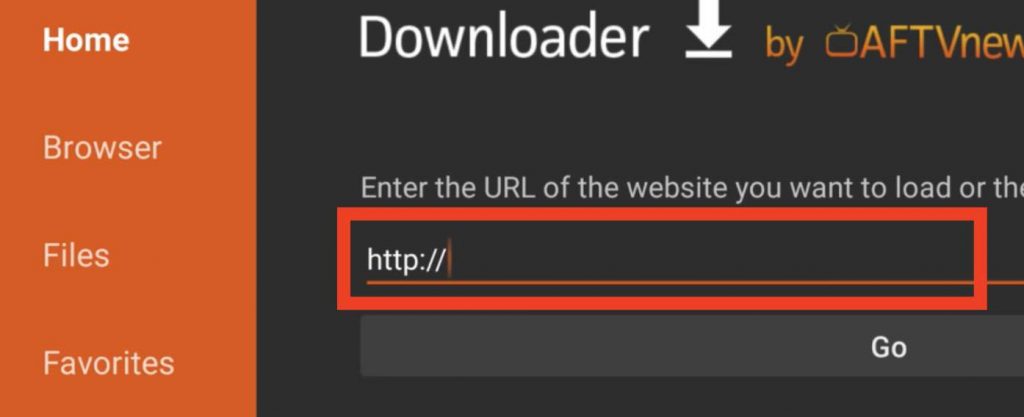
- Now you have to enter the URL in the Official website and Click the GO Button.
- Now you can able to see the official Acorn TV website and press the Start Free Trial button and enter all the required information and pay the subscription amount.
- Purchase the application.
- And watch all your favorite content from the Acorn TV on Firestick.
Method 3: Watch Acorn TV on Firestick by Using an APK Method:
This is another method to watch Acorn TV on Firestick using an APK method. For this process also you have to need to fix a VPN server.
- Launch your Firestick home page and press the Find option tab and choose the search option.

- In the search bar type “Downloader” and click the Find option.
- Hit the application from the suggestion list.

- Press the Download button.
- Once the application is installed then you return back to the Firestick Home page and Press the setting option.

- Press the My Fire TV option and also choose the Developer option.
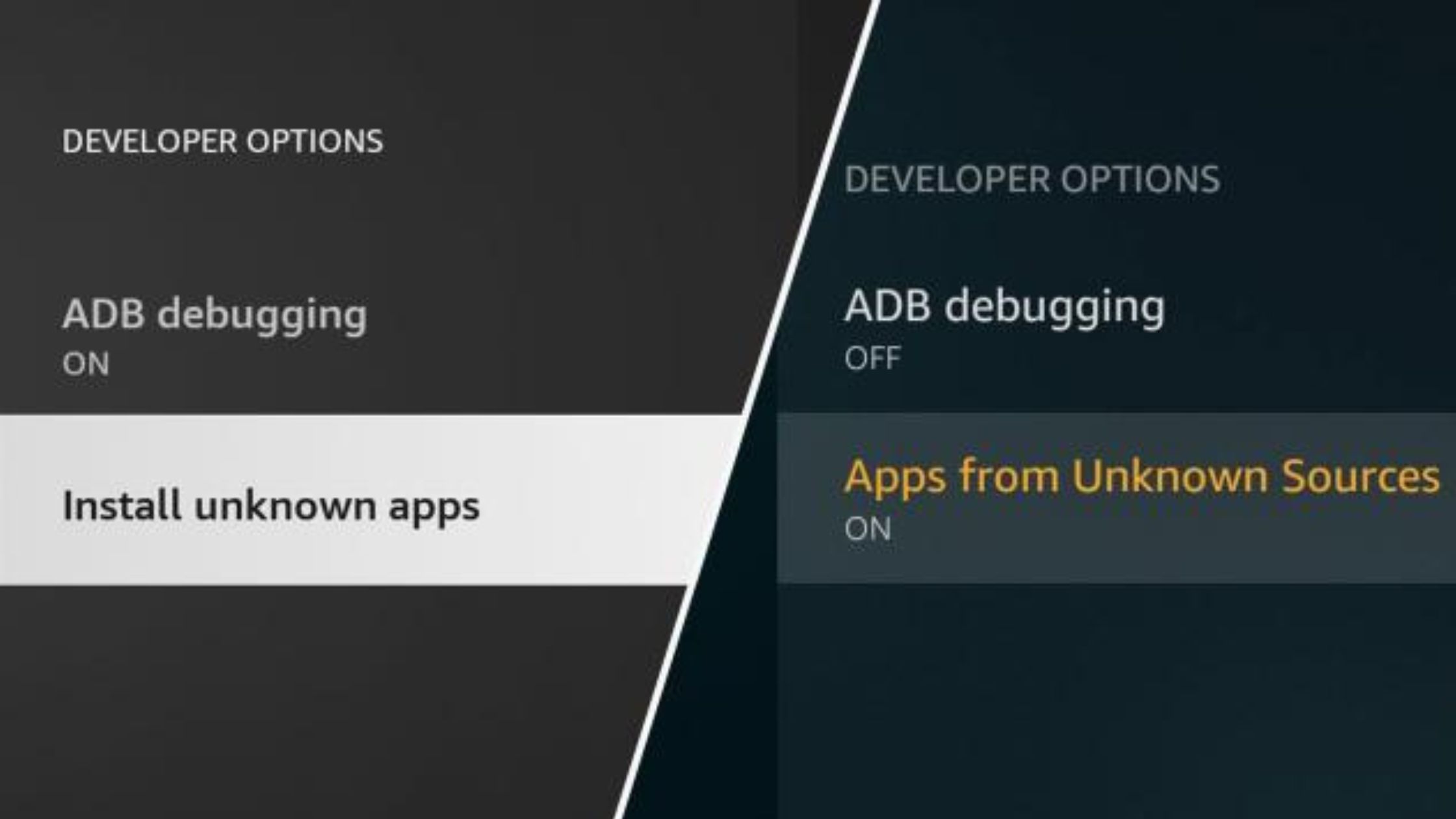
- Following this Click Install unknown apps setting and Proceed with the upcoming Section.

- Turn on the developer option.
- Now the Downloader application page will be open and you have to enter the URL link.
- Click the Allow button to access the media.
- You should Wait for the File to install on your device and again press the Install button.
- It takes some time to launch the Acorn TV application on Firestick.
Check the Post: How to Watch Lifetime on Firestick
How Much is the Cost of an Acorn TV Subscription:
Acorn TV application is a subscription package so you have to pay the subscription to watch its Acorn TV content on your device. Along with the subscription you can obtain a seven-day free trial day. Here we are going to share the subscription details.
- monthly Plan- At the cost of $5.99 for one month.
- Yearly Plan- You can get the yearly plan at the cost of $59.99 per month.
Also, Read How to Install Apps on Firestick
Highlights of Acorn TV:
- The Acorn TV application is accessible in nearly 15 countries over the World.
- You can obtain new updated episodes and series in the Weekend automatically.
- Also, you can get Subtitles for every Video content and also have the option to turn off or on the subtitles.
- Moreover, you can search for your favorite shows and Videos by using the Search Bar.
- In addition, it is compatible with Firestick, Android, Windows, iOS, Mac, Apple TV, Roku, Smart TV, and More devices.
Popular Shows on Acorn TV:
Every people will decide the Channel Quality and rating depends upon the better quality of shows and programs. In this way, you can get better quality Content, shows, and Programs from Acorn TV. Here we will share some popular Shows and programs. Check out the below tabular column.
| The Popular Shows on Acorn TV | |
| Agatha Raisin |
The Brokenwood Mysteries
|
| Mystery Road. | Golden Years. |
| Gold Digger | Wreckers |
| Manhunt | Sisters of War |
| Line of Duty | Mind Game |
| Deadwater Fell. | The Scapegoat |
| A Place to Call Home |
The Great Train Robbery
|
| The Heart Guy | Care |
| My Life is Murder | United |
| Under Capricorn | Wreckers |
| The Lilac Bus | The Way Back |
Closing Off
Here in this article, we mentioned the three possible ways to install the Acorn TV on Firestick. The Acorn TV is available in the United States. In any case, you need to access the Acorn TV content then you have to get help from the sideloaded application to download the Acorn TV. Referring to the above article, we included additional information such as popular programs, and Installation steps. We hope this article is helped you to download your Favorite Acorn TV app on your Firestick. If you have any queries or doubts related to this guide. Let me know in this comment section.